人々がバーチャルミーティングに対して抱く最大の懸念は、ハッカーが会話に忍び込むことです。 Jitsi Meet takes these worries and throws them out of the window. But what is Jitsi Meet? For that, let’s introduce you to this platform.
Jitsi Meetは、無料のソフトウェアで、安全にビデオ会議を行うことができます。 It uses special encryption techniques to make sure conversations stay private and protected.
What’s more? Being open-source software means experts can examine it to ensure it’s reliable and trustworthy.
Are you ready to take a deep dive into this neat platform? Then continue reading this article where you will learn the features and benefits of Jitsi Meet. We will also compare it with other platforms and discover how to install and use it.
Understanding Jitsi Meet: Features and Functionality
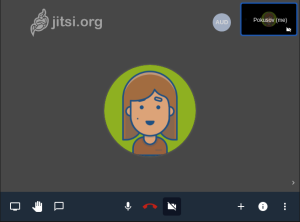
After an introduction to Jitsi Meet, let’s look at its features. While video conferencing is its prime use, you can do other valuable tasks as well.
- 音声会議:顔を見せたくない場合は、見せる必要はありません。電話で話しているかのように、明確で信頼性のある会話を楽しんでください!
- 画面共有: It allows you to share your screen, which makes it perfect for work and school presentations.
- チャット機能:何かを繰り返してほしい場合や提案がある場合は、チャットでメッセージを送信するだけで済みます。
- 手を挙げる:話したい場合や質問がある場合は、仮想的に「手を挙げる」ことができます。これにより、ホストやプレゼンターの注意を引き、大人数のグループでの議論を管理するのに役立ちます。
- 録画:ホストが会議を録画することを可能にします。これにより、後でレビューしたり、参加できなかった人と共有したりするのに役立ちます。
- ブレイクアウトルーム:会議をブレイクアウトルームと呼ばれる小さなグループに分けることができます。これは、集中した議論やグループ活動に役立ちます。
- モデレーターコントロール: The host has special controls to manage the meeting. They can mute or unmute people, control video settings, and manage who can do what in the meeting.
Jitsi Meetと他のビデオ会議ソリューションの比較
The market is filled with video conferencing platforms that all claim to be the best. So how do you choose one? Well, let’s compare Jitsi Meet, scoring 4.14 stars, with other famous platforms to help you decide.
まず大手のZoomから始めると、最初の違いは価格です。Zoomには無料版と有料版がありますが、Jitsiは常に無料です。しかし、Jitsiのビデオ品質については不満が寄せられていますが、HDをサポートしています。アカウントを作成する必要がないため、使用に関してはZoomを上回ります。Zoomの評価は4.64星です。

Zoomの次はGoogle Meetです。Google Meetの星評価は4.47です。Google Meetは無料ではないことを念頭に置いてください。 小規模な会議を開催したい場合はJitsiが最適ですが、大規模な会議にはGoogle Meetの方が適しています。 また、Jitsiではより多くのコントロールが得られます。
4つ星の評価を持つSkypeに移ります。ただし、MicrosoftがSkypeを所有しているため、その信頼性が高まります。しかし、Skypeではカスタマイズができないという点があります。さらに、Jitsiはすべてのプラットフォームでウェブを通じて使用できるのに対し、Skypeは専用アプリケーションを提供しています。
自分のニーズに最適なプラットフォームを選ぶことを忘れないでください。
ステップバイステップガイド:Jitsi Meetを使用したビデオ会議の方法
After learning all the wonderful features, you must be curious about how to install Jitsi Meet. Well, here’s the answer. However, this would require some technical knowledge and server administration skills.
インストールするには、まず自分のサーバーまたは要件を満たすクラウドサーバーを設定します。 要件. Configure the domain and DNS settings, then follow your operating system’s official Jitsi Meet installation instructions.
次に、必要に応じて設定をカスタマイズし、SSL/TLS暗号化を含めます。すべてが正常に動作することを確認するためにテストとトラブルシューティングを行います。
必要な技術スキルがない場合は、Jitsiをサービスとして利用できます。これは、サービスプロバイダーとアカウントやサブスクリプションにサインアップできることを意味します。 ウェブホスティングゾーン. They would then provide you with the necessary details and instructions to use the platform.
However, using Jitsi Meet is easier. Visit the website, start a meeting without signing up, or edit the name if desired. Click ‘Start Meeting,’ grant permissions, and share the room link. Adjust controls for the meeting, and when done, click ‘Hang Up.’
Exploring the Benefits of Jitsi Meet for Online Communication

上記の手順に従ってJitsi Meetを使用した場合に得られるものを知りたいですか?それなら、読み続けてください。
まず、Jitsi Meetをダウンロードしたりサインアップしたりせずに使用を開始できます。 ウェブサイトにアクセスしてすぐにミーティングを作成するだけです。簡単で、時間を無駄にしません。
また、すべての人を見たり聞いたりするために、優れた映像と音質を提供します。そして、ポイントを詳しく説明するために画面を共有できないとき、どれほどイライラするでしょうか?Jitsiはそれを助けてくれます!
最後に、あなたのニーズに合わせてカスタマイズできます。使用している他のアプリやサービスと接続し、より効率的に作業しましょう。
Why Jitsi Meet Excels as a Video Conferencing Platform?
But these are not the only reasons why Jitsi Meet excels as a video conferencing platform. The real reason why Jitsi Meet is the best is its security.
プライバシーを真剣に考えています。無断アクセスから会話を保護するために暗号化を使用しています。また、追加のセキュリティのために自分のサーバーで会議をホストすることもできます。
ただし、会議のデフォルト名を変更することを忘れないでください。 また、ハッカーが推測して会議に入ることができるため、広く知られている用語は使用しないでください。
さらに、Jitsi Meetは多くの便利な機能を無料で提供しています。これは、自分の作業をオープンに共有する人々のコミュニティによって作られています。つまり、継続的に改善されており、誰でもアイデアを提供できます。まるで大きなチームの努力のようです!
結論
Jitsi Meetは、オンラインコミュニケーションに多くの利点を提供する一流のビデオ会議プラットフォームです。プライバシーとセキュリティを優先し、暗号化技術を使用しています。オープンソースのソリューションとして、業界の専門家から必要な支援を受けています。
Zoom、Google Meet、Skypeなどの他のプラットフォームと比較して、コスト効率、使いやすさ、カスタマイズオプションで際立っています。 さらに、ダウンロードや登録の必要なく、アクセス可能でユーザーフレンドリーな体験を提供します。