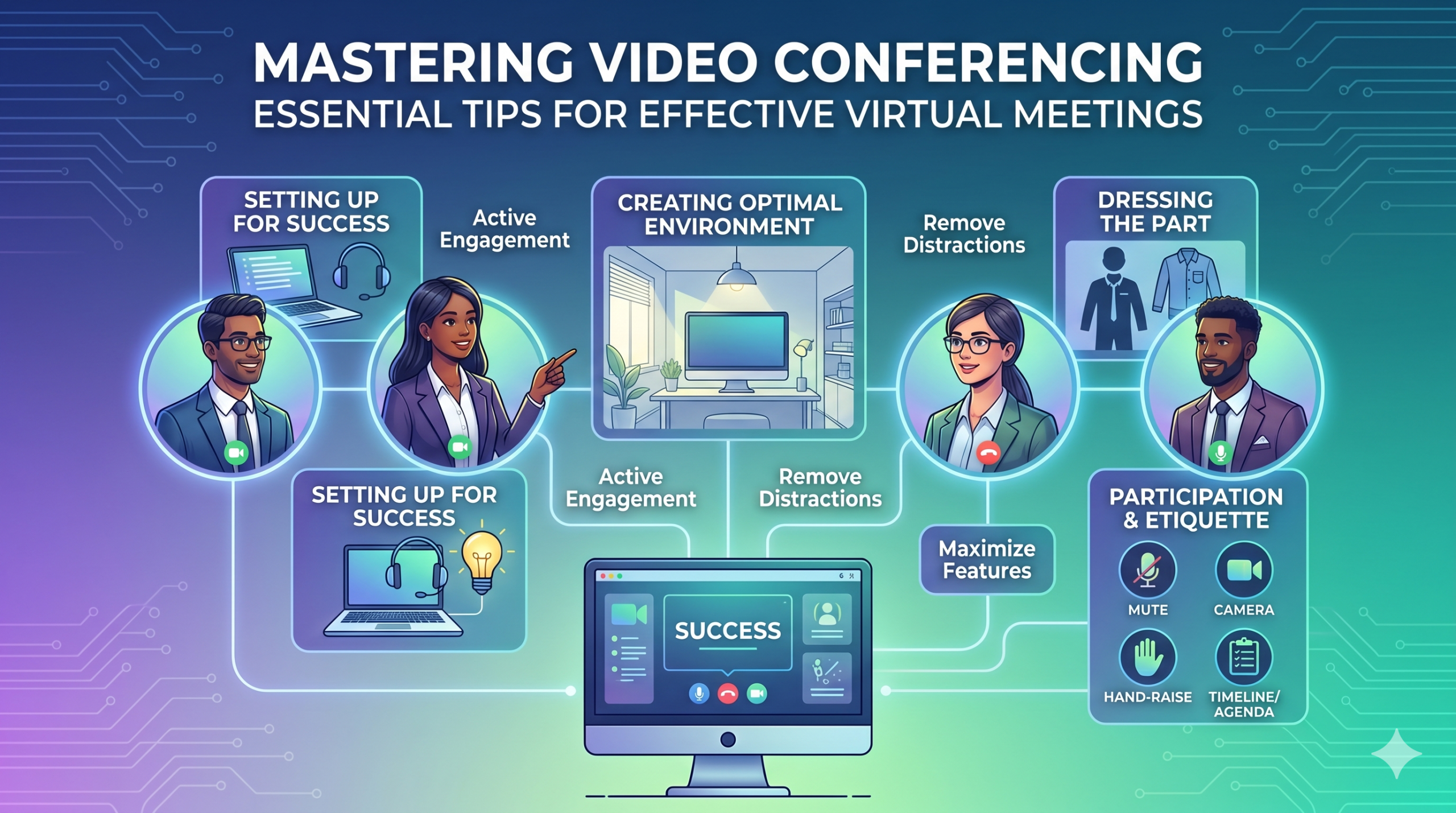

テクノロジーはビジネスの運営方法を急速に変化させており、今後もそのペースが緩むことはなさそうです。コミュニケーション、業務、ワークフローがすべて改善され、会社や従業員の所在地に関係なく、協力して作業することが容易になりました。
今やリモートワークは単なる特典ではなく、新しい常態となり、バーチャルミーティングが必要不可欠になっています。
ここで興味深い事実があります:ほぼ 従業員の96% は、ビデオ通話がリモートチームをよりつながりを感じさせるのに役立つと言いました。
In virtual meetings, employees are supposed to share thoughts, talk about relevant topics, and solve problems as a team. But more often than not, things don’t go as planned.
People start to tune out, conversations go off track, meetings go over time, and some participants aren’t engaged. The result? We’re left with a lot of room for improvement for virtual meetings to be truly productive and effective.
On the flip side, when meetings go well, there’s a positive vibe in the team, everyone understands their expectations and responsibilities, and productivity and efficiency increase.
That’s what the goal of a great video conference is, every time.
In this article, we’ll share some of the best video conferencing tips to help you achieve more success in your collaborative effects. So read on.
成功のための準備
Now that so many of us are partaking in video conferences more frequently, making oneself appear and sound professional isn’t always easy when seated in PJs from the waist down.
私たちは皆、会議のビデオ中にあまり理想的でない、あるいは恥ずかしい瞬間を目撃し、貢献してきたことでしょう。
To avoid such situations, here are some video conferencing tips that’ll help you set up for success from the start:
適切なツールの選択
まず第一に、選ぶプラットフォームは、チームが物事を進める方法に本当に大きな違いをもたらすことがあります。
間違ったものを選ぶと、会議のための長くて遅く、複雑な設定や、イベントに参加するのに苦労する人々、誰が参加したのかわからない、情報を提示したり対話するためのツールが限られているといった問題に直面するかもしれません。
To make the right call on the tool to use, figure out what’s most important for your team.
もしかしたら、ウェブブラウザで直接動作し、起動が非常に簡単で、インターフェースに複雑さがほとんどないプラットフォームが必要かもしれません。あるいは、ブレインストーミング用のホワイトボードや、会議を自動的に録画する機能を探しているのかもしれません。
効果的なバーチャルミーティングツールで探すべき一般的な機能をいくつかご紹介します:
- 使いやすさ:すべての人が簡単に使えるべきです。特にソフトウェアの使用に不慣れな技術初心者でも。
- 良質なビデオと音声:ぼやけたビデオや遅延する音声は誰も望んでいません。一部のツールは、他のツールよりも低いWi-Fi信号をうまく処理します。
- Interactive Tools: Tools that help everyone participate and engage – like sending visual reactions, chatting and sharing documents, and more.
- 分析:ミーティングに関する情報を取得して改善する(時間、参加者数、エンゲージメント統計など)。
- 必要なすべてをカバー:ツールは、実際に必要なことのために、ミーティングの前、最中、後にうまく機能するべきです。
効果的な会議のための追加のヒント
予定されたミーティングのかなり前に会議の招待が届く可能性が高いです。事前にウェブサイトにアクセスするか、アプリをダウンロードしてログインし、すべてが正常に動作することを確認してください。
会議に遅れないようにしてください。ログインするためのパスワードを思い出そうとしていたり、カメラやマイクにアクセスするための「権限が必要です」というプロンプトをナビゲートしているからといって。
ほとんどのビデオ会議サイトでは、ハードウェアの不具合を解消するためにテスト会議を作成することができます。例えば、ウェブカメラが動作しないことや、会議中にマイクの音が小さすぎることを確認できます。
最適な環境を作る
ビデオ通話で素敵に見える方法は知っているかもしれませんが、ビデオ会議の背景はどうでしょうか?それはあなたについて多くを語ることができ、必ずしも良い意味ではありません。
プロフェッショナルな環境で正しいメッセージを送るためのビデオ会議のための簡単なヒントをいくつか紹介します:
- Get the Lighting Right: Good lighting makes you look professional. Use natural light from a window. Or go for soft and even lighting. Just don’t have too much light behind you.
- Keep the Background Simple: Don’t clutter your background with too many items. Keep it tidy and neutral. You can add a few personal items for a friendly touch.
- 意図的に装飾する:背景に棚や本棚がある場合は、会議に関連する賞やメモを展示しましょう。目的を持たせてください。
- ドアと窓を避ける: カメラをドアや窓から離して向け、気を散らすことや照明の問題を防ぎましょう。
- Position Your Webcam Right: Place your webcam at eye level, three to eight feet away from you. That’ll help you avoid distortions.
- Create a Permanent Setup: Designate a spot for video calls so you don’t scramble every time. You can use a fabric or paper backdrop for convenience.
- ウェブカメラのプレビューを使用: 通話の前にカメラでの見え方を確認しましょう。必要に応じて調整を行います。
予期しないことが起こった場合(例えば、幼児が乱入するなど)、冷静を保ち、プロフェッショナリズムを維持することを忘れないでください。あなたのエネルギーも「環境」に寄与するので、冷静さを失わないように集中しましょう。
プレゼンテーションとエンゲージメント
役割にふさわしい服装
プロフェッショナルな会議には適切に服装を整えましょう。
We’ve all had those days when working from home meant staying in pajamas for most of the day. It’s all good if you don’t have any video meetings. But when you do, it’s a big no-no for you and everyone else on the call.
仕事に適した服装を着用してください。
You and your team should look the part for virtual meetings, even if it’s casual. You don’t need to wear a suit or a fancy dress but avoid wearing anything you wouldn’t wear at the office. Also, it’s a bit tricky to feel like you’re working when you’re in the same clothes you crashed out in.
You have a choice, though. You can look professional on top and keep comfy sweatpants or leggings on the bottom, out of sight. It’s your call, but being fully dressed might help you keep your head in the game.
積極的な参加
カメラを直接見てください。
Many participants make this slip-up—they look at the video screen instead of the camera when talking to someone online. It might feel natural, but it actually makes you seem like you’re not fully engaged.
It can make you look a bit distant and not so professional. And it’s pretty obvious when you’re not all there during a video call.
こう考えてみてください: looking right into the camera lens is like looking someone in the eye when talking face-to-face. If someone talking to you in real life looks elsewhere instead of keeping eye contact, you’d think they are not interested in what you’re saying, right?
Looking directly into the camera is one of the basic video meeting etiquette. So, give it a go until you get the hang of it. It’ll make you seem more connected and professional during your virtual meetings.
Also, shut down all the extra apps and tabs you don’t need and turn off those pesky notifications that can distract you and your mates.
話していないときはミュートにしてください。
People can often tune out background noise on their end, but it’s tough to ignore when you’re on the receiving end of the call.
Nobody’s keen to listen to your cat’s meow in the background. And if they do, you might find the meeting topic shifting to “What cat breed is that? She’s gorgeous!”
Unmuted people can be quite distracting and take the meeting off track. So, let’s make a rule: keep yourself muted unless you are about to speak for a better video conference.
他の人の上で話さないでください。
Things can get pretty tricky when you have a bunch of people on the same video call. Be patient, and do not jump in while others are talking—it’s rude and against conference call etiquette.
質問は最後まで取っておいて、皆が自分の考えを共有できるようにしましょう。特に本当に価値のあることを共有したいときに、常に中断されたり話を遮られたりすることほど、気が滅入ることはありません。
テクノロジーを使ってリモート参加者を巻き込む。
あなたはオンライン会議の参加者が含まれていると感じ、快適であることを望んでいます。会議に関する情報によると、 レポート, two big issues for remote workers during conference calls are not wanting to interrupt others and not seeing everyone’s faces.
バーチャル会議をよりアクセスしやすくするために、ビデオ通話の品質を向上させましょう。
また、マイクとカメラを適切に配置し、字幕を使用し、電話での参加オプションを提供してください。共有ドキュメントがすべての参加者に簡単に見えるようにしてください。
会議の参加者を受動的な観察者から能動的な参加者に変えましょう。ホワイトボードを使って創造性を促し、投票で意思決定を行い、チャットで意見を共有し、楽しい絵文字で反応を表現しましょう。
エチケットと考慮事項
時間管理
時間厳守 – 常に時間通りに行動しましょう。
This rule applies to all kinds of meetings—in person, on video, or a mix of both. But it’s one of the must-follow video conference best practices in particular. You see, making those personal connections is tougher through screens. Even though tech helps, it’s pointless if you’re absent. So, be there for your colleagues and respect their time.
スケジュールを立てる際には、タイムゾーンを考慮してください。
すべてのバーチャルミーティングにすべての人を含めることはできないかもしれませんが、誰もが参加する機会を得られるようにすることはできます。
One of the tips for video conferencing to consider is to just think about when people are usually busy with their work, where they’re located, and what time zone they’re in. Then, plan your meetings to fit around these factors so that everyone can be a part of it.
会議の前に議題を送信してください。
Keep things simple and clear when you’re getting ready for a meeting. Ensure you’ve got a clear idea of what you want to achieve, and share the plan with your team in advance. This allows everyone to think about what they want to say or ask, setting the foundation for a successful video conference.
整理整頓を保つために、会議の議題にスケジュールを含めてください。これにより、軌道を維持し、脱線しないようにします。会議を始める前に少しの友好的な雑談の時間を設けることも大切です—ポジティブな雰囲気を築くのに役立ちます。
気を散らさないようにする
環境から潜在的な気を散らす要因を取り除いてください。
When you’re right in the thick of a busy workday, you might feel like having a go at doing other things during a video call. But humans aren’t that great at multitasking—only about 2.5%の人々だけです.
一度に多くのことをしようとすると、ストレスを感じたり、集中力を失ったりすることがあります。また、通話中のチームメイトにとってもかなり気が散ることがあります。そこで、従うべきビデオ会議のプロトコルを以下に示します:
- コンピュータ上の他の作業を閉じてください。
- 複数の画面がある場合は、そのビデオ通話とウェブカメラを目の前に配置してください。
- コンピュータと電話の通知を無音にしてください。
- 通話中にソーシャルメディアをチェックしたいという衝動に抵抗してください。
- If you’re working from home with the family around, give them a heads up that you’re on a call so they don’t come barging in.
会議には常に全力で注意を払ってください。
Avoid the urge to check emails or tinker with your PowerPoint during video calls; it’s just not good video conference etiquette. Similar to face-to-face meetings, showing respect to your colleagues by giving them your full attention is necessary.
Here’s one of the top video conferencing tips: If you wouldn’t do a particular action in person, don’t do it during a virtual meet-up.
結論:ビデオ会議の機能を最大限に活用する
チームワークとは、一緒に働き、重要なことを話し合い、良い結果を目指すことを意味します。バーチャルミーティングもそれと同じであるべきです。
Check out your virtual meeting tool’s reports to see how people got involved and what they liked best. You’ve hit the jackpot if the reports say that participants were all about the polls, questions, upvotes, and chats.
Use video tools to get your team chatting, steer them toward group goals, and ensure everyone has a positive vibe. That’s one of the top-secret tips for video conferencing.