
W tym artykule pokażę Ci jak zainstalować GIT na serwerze lub komputerze Ubuntu.
Istnieje szansa, że masz już preinstalowany GIT. Dlatego zanim spróbujesz zainstalować Git na Ubuntu, upewnij się, że nie jest on już zainstalowany. Otwórz terminal i wpisz:
$ git --version
git version 2.34.1
Jeśli wynik pokazuje wersję git, masz szczęście i git jest już zainstalowany na twoim komputerze Ubuntu. Możesz zacząć używać gita!
Instalowanie gita przez APT
If command “git –version” shows error “Command ‘git’ not found” then you need to install git. Use APT package manager to perform the installation.
$ sudo apt install git

The following NEW packages will be installed: git
After this operation, 18,9 MB of additional disk space will be used.
Get:1 http://ua.archive.ubuntu.com/ubuntu jammy-updates/main amd64 git amd64 1:2.34.1-1ubuntu1.10 [3 166 kB]
Fetched 3 166 kB in 1s (4 297 kB/s)
Selecting previously unselected package git.
(Reading database ... 402237 files and directories currently installed.)
Preparing to unpack .../git_1%3a2.34.1-1ubuntu1.10_amd64.deb ...
Unpacking git (1:2.34.1-1ubuntu1.10) ...
Setting up git (1:2.34.1-1ubuntu1.10) ...
Sprawdźmy, czy pakiet git jest poprawnie zainstalowany.
$ git --version
git version 2.34.1
That’s it. You can start using git. Did you expect more steps?
Suggested packages – which do you need?
Do instalacji sugerowane są dodatkowe pakiety: git-daemon-run, git-daemon-sysvinit git-doc git-email git-gui gitk gitweb git-cvs git-mediawiki git-svn. Co zapewniają
Co to jest git-daemon-run
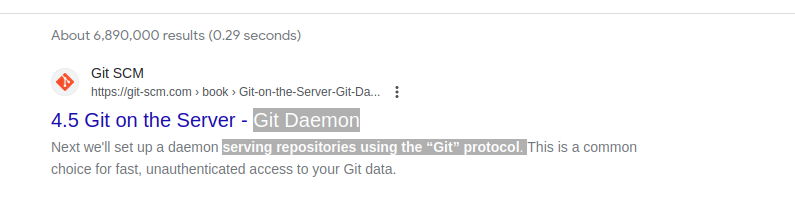
Szybkie wyszukiwanie w Google git-daemon-run ujawnia, że możliwe jest zdemonizowanie gita w celu uruchomienia własnego serwera Git. Jeśli chcesz, aby Twoje lokalne repozytoria Git były dostępne w sieci w celu współpracy, git-daemon może być dla Ciebie przydatny.
You do not need a Git daemon if you don’t plan to run own Git server. And if you plan to run own Git server – there are better options than a git-daemon, such as Gitolit, gita Lub podobny.
Co to jest git-doc
Zapytajmy repozytorium o informacje o pakiecie:
$ sudo apt show git-doc
Package: git-doc
Version: 1:2.34.1-1ubuntu1.10
Priority: optional
... omitting lines with info about developers ...

This package provides the documentation
As you can see git-doc package provides documentation. You don’t need to install it since all the dokumentacja gita możesz potrzebować, jest dostępny online.
Co to jest pakiet git-email
Lets run the same “apt show” trick with the git-email package.
$ sudo apt show git-email
Package: git-email
Version: 1:2.34.1-1ubuntu1.10
Priority: optional
This package provides the git-send-email program for sending series of
patch emails.
W niektórych przypadkach przydatne może być wysyłanie poprawek w formie wiadomości e-mail. Jeśli więc aktywnie rozwijasz i używasz GIT, ten pakiet może się przydać.
You don’t need extra packages to use GIT
Po zainstalowaniu gita śmiało zacznij go używać. Nie ma lepszego sposobu na naukę Gita niż praktyka. Utwórz puste repozytorium lub sklonuj istniejące repozytorium z Githuba i zacznij kodować!
Poniższe polecenie zainicjuje repozytorium Git w bieżącym katalogu.
$ git init
Initialized empty Git repository in /home/gitproject/.git/
And to clone an existing repository from Github use “git clone REPO_URL” command. For example:
$ git clone https://github.com/EugeneWHZ/canvaslms-ansible-installation.git
Cloning into 'canvaslms-ansible-installation'...
remote: Enumerating objects: 66, done.
remote: Total 66 (delta 0), reused 0 (delta 0), pack-reused 66
Receiving objects: 100% (66/66), 13.81 KiB | 589.00 KiB/s, done.
Resolving deltas: 100% (10/10), done.
Conclusion: use version control, it’s easy!
Zainstaluj Git i dodaj kontrolę wersji do swojego życia. Podziękujesz sobie za to później.