
במאמר זה אראה לכם כיצד להתקין GIT על שרת או מחשב של אובונטו.
יש סיכוי שכבר התקנת את GIT מראש. אז לפני שתנסה להתקין את Git באובונטו ודא שהיא לא מותקנת כבר. פתח את המסוף והקלד:
$ git --version
git version 2.34.1
אם הפלט מראה את הגרסה של git אז יש לך מזל ו-git כבר מותקן במחשב אובונטו שלך. אתה יכול להתחיל להשתמש ב-git!
התקנת git דרך APT
If command “git –version” shows error “Command ‘git’ not found” then you need to install git. Use APT package manager to perform the installation.
$ sudo apt install git

The following NEW packages will be installed: git
After this operation, 18,9 MB of additional disk space will be used.
Get:1 http://ua.archive.ubuntu.com/ubuntu jammy-updates/main amd64 git amd64 1:2.34.1-1ubuntu1.10 [3 166 kB]
Fetched 3 166 kB in 1s (4 297 kB/s)
Selecting previously unselected package git.
(Reading database ... 402237 files and directories currently installed.)
Preparing to unpack .../git_1%3a2.34.1-1ubuntu1.10_amd64.deb ...
Unpacking git (1:2.34.1-1ubuntu1.10) ...
Setting up git (1:2.34.1-1ubuntu1.10) ...
בוא נבדוק שחבילת git מותקנת כהלכה.
$ git --version
git version 2.34.1
That’s it. You can start using git. Did you expect more steps?
Suggested packages – which do you need?
ישנן חבילות נוספות המוצעות להתקנה: git-daemon-run, git-daemon-sysvinit git-doc git-email git-gui gitk gitweb git-cvs git-mediawiki git-svn. מה הם מספקים
מה זה git-daemon-run
חיפוש מהיר בגוגל ב-git-daemon-run חושף שאפשר לעשות דמוניזציה ל-git כדי להפעיל שרת Git משלו. אם אתה רוצה להפוך את מאגרי Git המקומיים שלך לנגישים דרך הרשת לשיתוף פעולה אז git-daemon עשוי להיות שימושי עבורך.
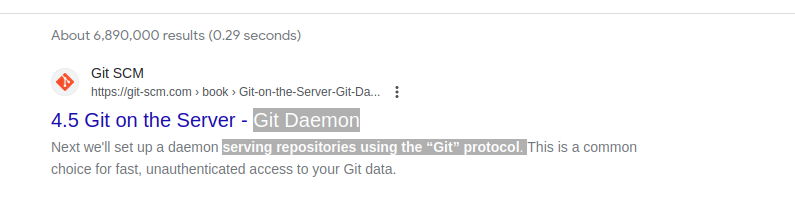
You do not need a Git daemon if you don’t plan to run own Git server. And if you plan to run own Git server – there are better options than a git-daemon, such as גיטוליט, גיטהה אוֹ דוֹמֶה.
מה זה git-doc
אפשר לשאול את המאגר מידע על החבילה:
$ sudo apt show git-doc
Package: git-doc
Version: 1:2.34.1-1ubuntu1.10
Priority: optional
... omitting lines with info about developers ...

This package provides the documentation
As you can see git-doc package provides documentation. You don’t need to install it since all the תיעוד git ייתכן שתצטרך זמין באינטרנט.
מהי חבילת git-email
Lets run the same “apt show” trick with the git-email package.
$ sudo apt show git-email
Package: git-email
Version: 1:2.34.1-1ubuntu1.10
Priority: optional
This package provides the git-send-email program for sending series of
patch emails.
זה עשוי להיות שימושי במקרים מסוימים לשלוח תיקונים כדואר אלקטרוני. אז אם אתה מפתח ומשתמש ב-GIT באופן פעיל החבילה הזו עשויה להיות שימושית.
You don’t need extra packages to use GIT
לאחר התקנת git המשך והתחל להשתמש בו. אין דרך טובה יותר ללמוד git מאשר על ידי תרגול. צור מאגר ריק או שיכפל מאגר קיים מ-Github והתחל בקידוד!
הפקודה למטה תתחיל מאגר Git בספרייה הנוכחית.
$ git init
Initialized empty Git repository in /home/gitproject/.git/
And to clone an existing repository from Github use “git clone REPO_URL” command. For example:
$ git clone https://github.com/EugeneWHZ/canvaslms-ansible-installation.git
Cloning into 'canvaslms-ansible-installation'...
remote: Enumerating objects: 66, done.
remote: Total 66 (delta 0), reused 0 (delta 0), pack-reused 66
Receiving objects: 100% (66/66), 13.81 KiB | 589.00 KiB/s, done.
Resolving deltas: 100% (10/10), done.
Conclusion: use version control, it’s easy!
התקן את Git והוסף בקרת גרסאות לחיים שלך. אתה תודה לעצמך על כך מאוחר יותר.