
ยกระดับการสัมมนาผ่านเว็บของคุณ: เปลี่ยน BigBlueButton ให้เป็นโซลูชันการสัมมนาผ่านเว็บที่มีประสิทธิภาพ
ระบบการประชุมผ่านเว็บแบบโอเพ่นซอร์ส BigBlueButton ถูกนำมาใช้กันอย่างแพร่หลายในโรงเรียน วิทยาลัย มหาวิทยาลัย และครูเอกชนทั่วโลกในการจัดชั้นเรียนออนไลน์และการประชุมทางวิดีโอ แต่ถ้าคุณต้องการจัดสัมมนาผ่านเว็บโดยที่คุณเป็นผู้นำเสนอเพียงคนเดียวและคนอื่นๆ เข้าร่วมในฐานะผู้ดูล่ะ? BigBlueButton อนุญาตให้เรียกใช้การสัมมนาผ่านเว็บด้วย! ในโพสต์นี้ ฉันจะแสดงวิธีแปลงระบบ BigBlueButton ให้เป็นแพลตฟอร์มการสัมมนาผ่านเว็บ
To turn BigBlueButton into a webinar system a moderator should make a simple fix – he should restrict users from sharing webcams and microphones and allow them to join as viewers only.
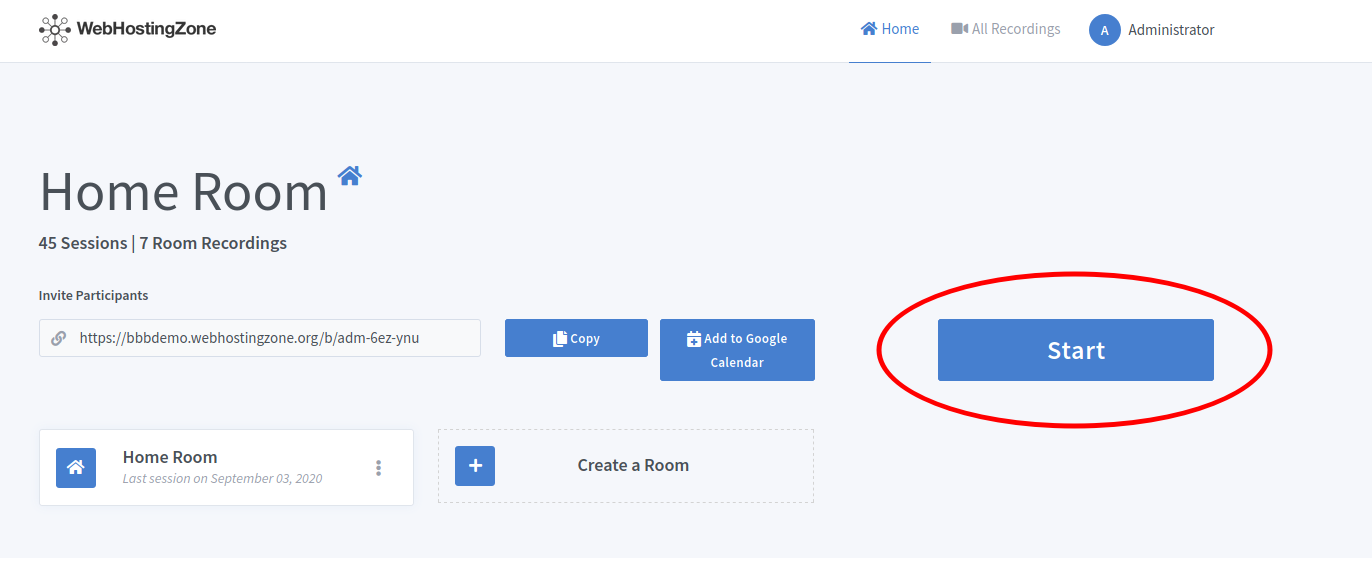
- จากภายในผู้ดูแลแผงควบคุม Greenlight จะเริ่มการประชุม
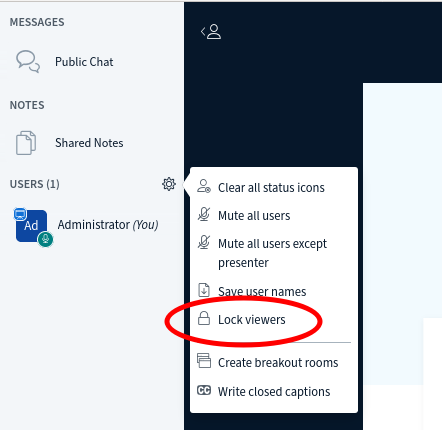
- Then click on the gear icon in the left column and after click “Lock viewers” link.
- A pop-up will appear. Lock the following features there: “share webcam”, “see other viewers webcams”, “share microphone” and optionally also lock “send Private chat messages”, “Edit Shared Notes”.
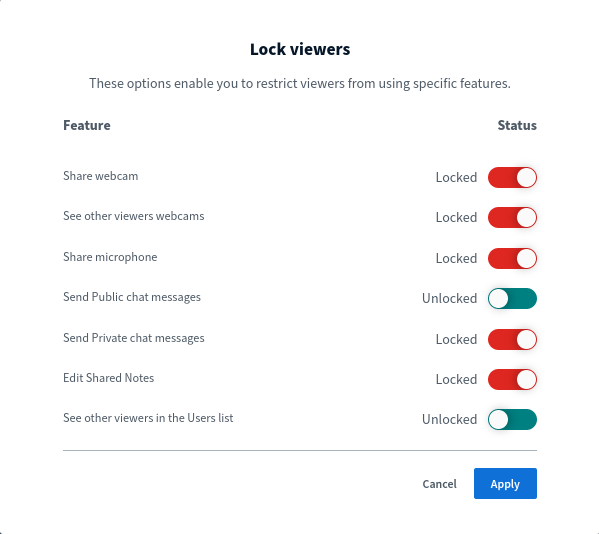
- Click on the “Apply” button in order to save changes.
ตอนนี้คุณสามารถเชิญผู้ใช้เข้าร่วมการสัมมนาผ่านเว็บได้โดยส่งลิงก์เข้าร่วมให้พวกเขา ผู้ใช้จะเข้าร่วมการประชุมในโหมดการสัมมนาทางเว็บ (โหมดดูอย่างเดียว) ขึ้นอยู่กับ ฮาร์ดแวร์ BigBlueButton ใช้แล้ว คุณสามารถจัดสัมมนาผ่านเว็บกับผู้ชม 100, 200, 500 และแม้แต่ 1,000 คน!
แท็ก:
โฮสติ้งเว็บไซต์