
Neste artigo vou mostrar como instalar o GIT no servidor ou computador Ubuntu.
É possível que você já tenha o GIT pré-instalado. Portanto, antes de tentar instalar o Git no Ubuntu, certifique-se de que ele ainda não esteja instalado. Abra o terminal e digite:
$ git --version
git version 2.34.1
Se a saída mostrar a versão do git, então você tem sorte e o git já está instalado em sua máquina Ubuntu. Você pode começar a usar o git!
Instalando o git via APT
If command “git –version” shows error “Command ‘git’ not found” then you need to install git. Use APT package manager to perform the installation.
$ sudo apt install git

The following NEW packages will be installed: git
After this operation, 18,9 MB of additional disk space will be used.
Get:1 http://ua.archive.ubuntu.com/ubuntu jammy-updates/main amd64 git amd64 1:2.34.1-1ubuntu1.10 [3 166 kB]
Fetched 3 166 kB in 1s (4 297 kB/s)
Selecting previously unselected package git.
(Reading database ... 402237 files and directories currently installed.)
Preparing to unpack .../git_1%3a2.34.1-1ubuntu1.10_amd64.deb ...
Unpacking git (1:2.34.1-1ubuntu1.10) ...
Setting up git (1:2.34.1-1ubuntu1.10) ...
Vamos verificar se o pacote git está instalado corretamente.
$ git --version
git version 2.34.1
That’s it. You can start using git. Did you expect more steps?
Suggested packages – which do you need?
Existem pacotes extras sugeridos para instalação: git-daemon-run, git-daemon-sysvinit git-doc git-email git-gui gitk gitweb git-cvs git-mediawiki git-svn. O que eles fornecem
O que é git-daemon-run
Uma rápida pesquisa no Google sobre git-daemon-run revela que é possível demonizar o git para executar o próprio servidor Git. Se você deseja tornar seus repositórios Git locais acessíveis pela rede para colaboração, o git-daemon pode ser útil para você.
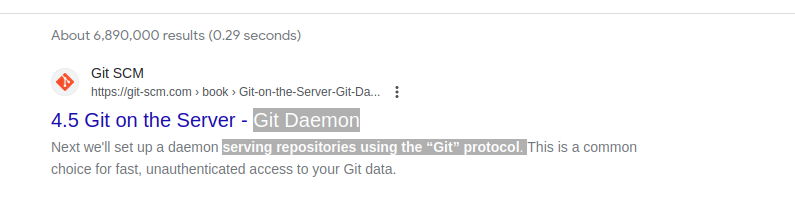
You do not need a Git daemon if you don’t plan to run own Git server. And if you plan to run own Git server – there are better options than a git-daemon, such as Gitolita, gitea ou semelhante.
O que é git-doc
Vamos consultar o repositório para obter informações sobre o pacote:
$ sudo apt show git-doc
Package: git-doc
Version: 1:2.34.1-1ubuntu1.10
Priority: optional
... omitting lines with info about developers ...

This package provides the documentation
As you can see git-doc package provides documentation. You don’t need to install it since all the documentação git que você pode precisar está disponível on-line.
O que é o pacote git-email
Lets run the same “apt show” trick with the git-email package.
$ sudo apt show git-email
Package: git-email
Version: 1:2.34.1-1ubuntu1.10
Priority: optional
This package provides the git-send-email program for sending series of
patch emails.
Pode ser útil em alguns casos enviar patches como e-mails. Portanto, se você estiver desenvolvendo e usando GIT ativamente, este pacote pode ser útil.
You don’t need extra packages to use GIT
Depois que o git estiver instalado, vá em frente e comece a usá-lo. Não há melhor maneira de aprender git do que praticando. Crie um repositório vazio ou clone o repositório existente do Github e comece a codificar!
O comando abaixo iniciará um repositório Git no diretório atual.
$ git init
Initialized empty Git repository in /home/gitproject/.git/
And to clone an existing repository from Github use “git clone REPO_URL” command. For example:
$ git clone https://github.com/EugeneWHZ/canvaslms-ansible-installation.git
Cloning into 'canvaslms-ansible-installation'...
remote: Enumerating objects: 66, done.
remote: Total 66 (delta 0), reused 0 (delta 0), pack-reused 66
Receiving objects: 100% (66/66), 13.81 KiB | 589.00 KiB/s, done.
Resolving deltas: 100% (10/10), done.
Conclusion: use version control, it’s easy!
Instale o Git e adicione controle de versão à sua vida. Você vai se agradecer por isso mais tarde.