
In questo articolo ti mostrerò come installare GIT su server o computer Ubuntu.
È possibile che tu abbia già GIT preinstallato. Quindi, prima di provare a installare Git su Ubuntu, assicurati che non sia già installato. Apri il terminale e digita:
$ git --version
git version 2.34.1
Se l'output mostra la versione di git, allora sei fortunato e git è già installato sulla tua macchina Ubuntu. Puoi iniziare a usare git!
Installazione di git tramite APT
If command “git –version” shows error “Command ‘git’ not found” then you need to install git. Use APT package manager to perform the installation.
$ sudo apt install git

The following NEW packages will be installed: git
After this operation, 18,9 MB of additional disk space will be used.
Get:1 http://ua.archive.ubuntu.com/ubuntu jammy-updates/main amd64 git amd64 1:2.34.1-1ubuntu1.10 [3 166 kB]
Fetched 3 166 kB in 1s (4 297 kB/s)
Selecting previously unselected package git.
(Reading database ... 402237 files and directories currently installed.)
Preparing to unpack .../git_1%3a2.34.1-1ubuntu1.10_amd64.deb ...
Unpacking git (1:2.34.1-1ubuntu1.10) ...
Setting up git (1:2.34.1-1ubuntu1.10) ...
Verifichiamo che il pacchetto git sia installato correttamente.
$ git --version
git version 2.34.1
That’s it. You can start using git. Did you expect more steps?
Suggested packages – which do you need?
Sono suggeriti pacchetti aggiuntivi per l'installazione: git-daemon-run, git-daemon-sysvinit git-doc git-email git-gui gitk gitweb git-cvs git-mediawiki git-svn. Cosa forniscono?
Cos'è git-daemon-run
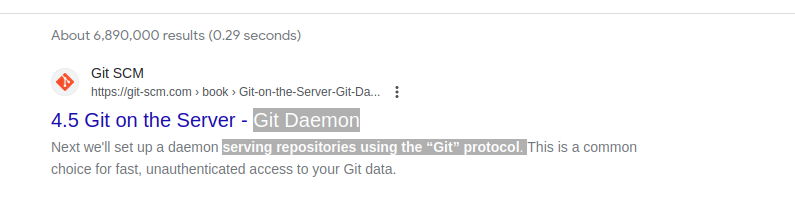
Una rapida ricerca su Google su git-daemon-run rivela che è possibile demonizzare git per eseguire il proprio server Git. Se vuoi rendere i tuoi repository Git locali accessibili in rete per la collaborazione, git-daemon potrebbe esserti utile.
You do not need a Git daemon if you don’t plan to run own Git server. And if you plan to run own Git server – there are better options than a git-daemon, such as Gitolite, gita O simile.
Cos'è git-doc
Interroghiamo il repository per informazioni sul pacchetto:
$ sudo apt show git-doc
Package: git-doc
Version: 1:2.34.1-1ubuntu1.10
Priority: optional
... omitting lines with info about developers ...

This package provides the documentation
As you can see git-doc package provides documentation. You don’t need to install it since all the documentazione di Git potresti aver bisogno è disponibile online.
Cos'è il pacchetto git-email
Lets run the same “apt show” trick with the git-email package.
$ sudo apt show git-email
Package: git-email
Version: 1:2.34.1-1ubuntu1.10
Priority: optional
This package provides the git-send-email program for sending series of
patch emails.
In alcuni casi potrebbe essere utile inviare le patch tramite email. Quindi, se stai sviluppando e utilizzando attivamente GIT, questo pacchetto potrebbe tornare utile.
You don’t need extra packages to use GIT
Una volta installato git, vai avanti e inizia a usarlo. Non c'è modo migliore per imparare Git che con la pratica. Crea un repository vuoto o clona il repository esistente da Github e inizia a scrivere codice!
Il comando seguente avvierà un repository Git nella directory corrente.
$ git init
Initialized empty Git repository in /home/gitproject/.git/
And to clone an existing repository from Github use “git clone REPO_URL” command. For example:
$ git clone https://github.com/EugeneWHZ/canvaslms-ansible-installation.git
Cloning into 'canvaslms-ansible-installation'...
remote: Enumerating objects: 66, done.
remote: Total 66 (delta 0), reused 0 (delta 0), pack-reused 66
Receiving objects: 100% (66/66), 13.81 KiB | 589.00 KiB/s, done.
Resolving deltas: 100% (10/10), done.
Conclusion: use version control, it’s easy!
Installa Git e aggiungi il controllo della versione alla tua vita. Ti ringrazierai per questo più tardi.