
If you are reading this article then you are in trouble. You wanted to edit a file using vim editor but got stuck in it. Stop panicking and wait with re-installing the OS and starting all from scratch – in this article I will show you how to exit a vim trap.
Iziet no VIM redaktora, izmantojot taustiņu kombinācijas
Vim redaktors ir sarežģīts iesācējiem, bet, kad jūs iemācīsieties pareizās taustiņu kombinācijas, izmantojot VIM, kļūst viegli. Šeit ir vispopulārākās taustiņu kombinācijas, lai izietu no vim.
Iziet no vim, saglabājot izmaiņas
Lai izietu no vim, saglabājot izmaiņas, nospiediet Esc taustiņu, lai izietu no rediģēšanas režīma, pēc tam turiet nospiestu Shift un nospiediet kolonnu key (:). Then enter “wq” and press Enter. Here “w” stands for write and “q” stands for “quit”. On US keyboards the colon : ir tas pats taustiņš kā semikols ;, located right of the letter “L” key.
:wq
Iziet no vim bez izmaiņu saglabāšanas
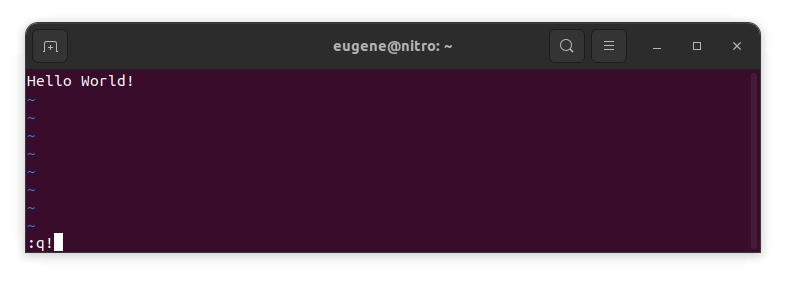
To exit vim without saving changes hold down Shift and press the colon key (:). Then enter “q!” and press Enter.
:q!
Saglabāt izmaiņas, neiznākot no VIM redaktora
To save changes without exiting vim hold down Shift and press the colon key (:). Then enter “w” and press Enter.
:w
Iemācīties strādāt ar VIM
Tagad, kad esmu apskatījis pamatus par izeju no Vim un izmaiņu saglabāšanu, turpināsim ar dažiem papildu noderīgiem Vim īsinājumtaustiņiem un funkcijām, lai uzlabotu jūsu prasmes.
VIM palaišana, lai rediģētu failu
Parasti izstrādātāji palaiž vim, lai rediģētu failu, izmantojot komandu:
vim filename
Ja fails trūkst, tas tiks izveidots. Jūs varat norādīt vairākus failus rediģēšanai:
vim file1 file2 file3
Lai atvērtu failu konkrētā rindā, jūs varat pievienot +[num] pēc vim komandas. Piemēram, lai atvērtu failu 127. rindā, ierakstiet:
vim filename +127
Navigācija VIM
Once you’ve entered Vim, navigating efficiently is key. Here are some popular shortcuts:
- Kursora pārvietošana:
- Izmantojiet bulttaustiņus, lai pārvietotos attiecīgajās virzienos (uz augšu, uz leju, pa kreisi, pa labi).
- Alternatively, employ the
h,j,k, andlkeys for left, down, up, and right movements, respectively.
- Vārdu navigācija:
- Move the cursor to the beginning of the next word with
w. - Navigate to the end of the current word using
e. - Jump to the beginning of the previous word with
b.
- Move the cursor to the beginning of the next word with
- Rindas navigācija:
- Go to the start of the line by pressing
0. - Move to the end of the line with
$.
- Go to the start of the line by pressing
Teksta rediģēšana VIM
Once you’ve reached the desired location, these shortcuts will aid in text manipulation:
- Ievades režīma aktivizēšana:
- Press
ito enter insert mode before the cursor. - Use
Ito start inserting at the beginning of the line. - Employ
ato append after the cursor. Aļauj pievienot rindu beigās.
- Press
- Teksta dzēšana:
- Delete the character under the cursor with
x. - Erase the entire line with
dd. - Cut (delete) the current line and enter insert mode with
cc.
- Delete the character under the cursor with
- Kopēt un ielīmēt:
- Copy a line with
yy. - Paste the copied line below the current line using
p.
- Copy a line with
- Atcelt un atkārtot:
- Undo the last action with
u. - Redo with
Ctrl + r.
- Undo the last action with
Meklēšana VIMā
Efektīva meklēšana ir svarīga. Šeit ir daži meklēšanas saīsinājumi:
- Meklēšana pēc teksta:
- Initiate a search with
/, followed by the desired term. - Use
nto jump to the next occurrence andNto go to the previous one.
- Initiate a search with
- Teksta aizvietošana:
- Substitute the current word with a new one using
:s/old/new/g.
- Substitute the current word with a new one using
Iziet no Vim
Es jau esmu apskatījis pamatus sākumā, bet šeit ir vēl daži varianti:
- Saglabāt un iziet no visiem:
- To save all changes and quit multiple files simultaneously, use
:waun:qa.
- To save all changes and quit multiple files simultaneously, use
- Iziet bez saglabāšanas:
- If you want to exit Vim without saving any changes made in any of the files,
:qa!will do the trick.
- If you want to exit Vim without saving any changes made in any of the files,
Secinājums
Atceries, ka Vim apgūšana prasa laiku un praksi. Jo vairāk tu to lieto, jo ērtāks un jaudīgāks tas kļūst. Priecīgu rediģēšanu!