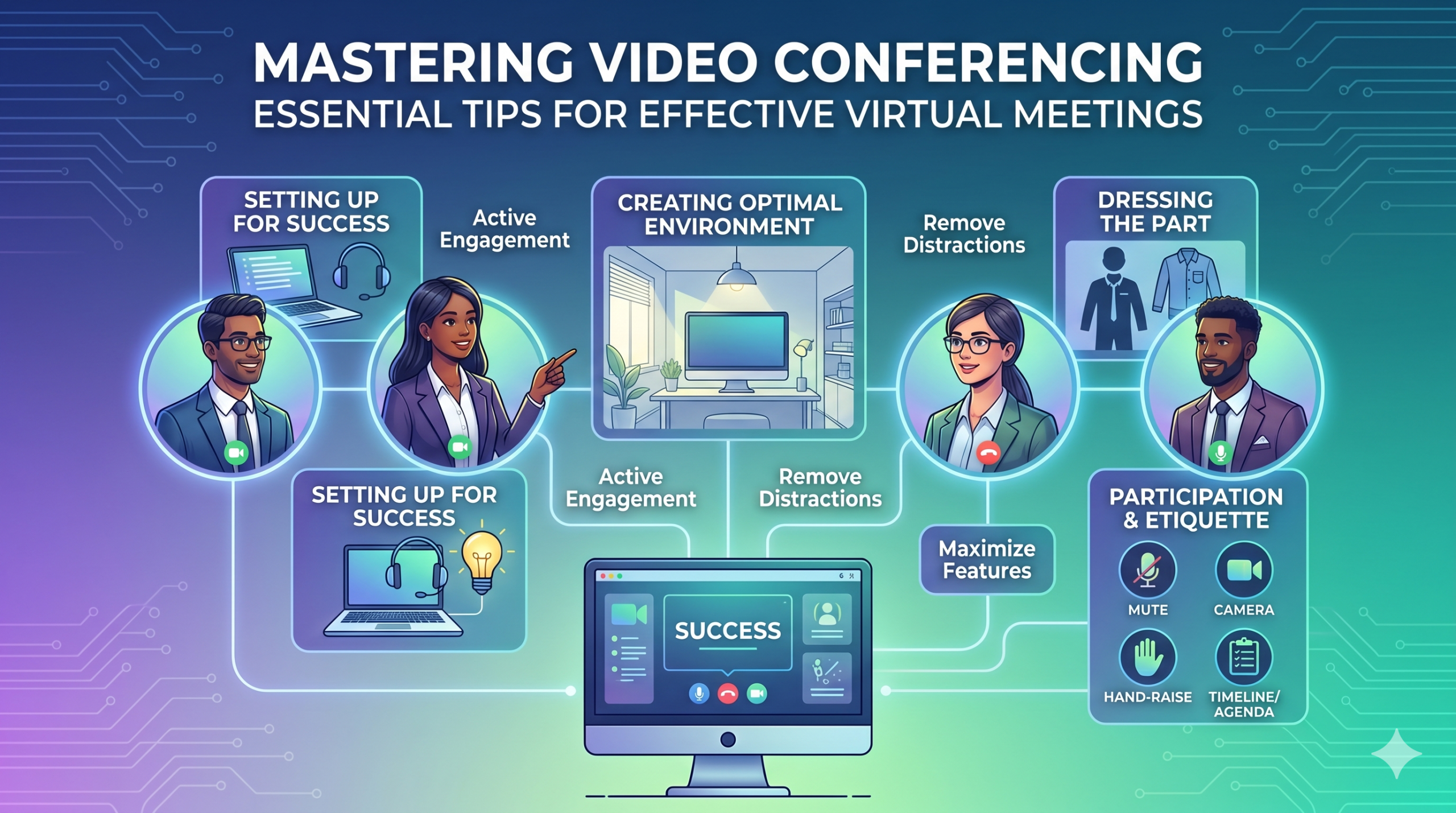

La tecnologia ha cambiato rapidamente il modo in cui le aziende operano e non sembra che rallenterà presto. La comunicazione, le operazioni e il flusso di lavoro sono migliorati, rendendo più semplice il lavoro collaborativo, indipendentemente dalla sede dell'azienda o dei dipendenti.
Ora, il lavoro a distanza non è solo un vantaggio, ma una nuova norma, che rende le riunioni virtuali una necessità.
Ecco un fatto interessante: Quasi 96% dei dipendenti le videochiamate aiutano i team remoti a sentirsi più connessi.
In virtual meetings, employees are supposed to share thoughts, talk about relevant topics, and solve problems as a team. But more often than not, things don’t go as planned.
People start to tune out, conversations go off track, meetings go over time, and some participants aren’t engaged. The result? We’re left with a lot of room for improvement for virtual meetings to be truly productive and effective.
On the flip side, when meetings go well, there’s a positive vibe in the team, everyone understands their expectations and responsibilities, and productivity and efficiency increase.
That’s what the goal of a great video conference is, every time.
In this article, we’ll share some of the best video conferencing tips to help you achieve more success in your collaborative effects. So read on.
Prepararsi per il successo
Now that so many of us are partaking in video conferences more frequently, making oneself appear and sound professional isn’t always easy when seated in PJs from the waist down.
Probabilmente tutti abbiamo assistito e contribuito ad alcuni momenti tutt'altro che ideali o addirittura imbarazzanti durante un video di conferenza.
To avoid such situations, here are some video conferencing tips that’ll help you set up for success from the start:
Scegliere gli strumenti giusti
Per prima cosa: la piattaforma che scegli può davvero fare la differenza nel modo in cui i tuoi team portano a termine le attività.
Se scegli quello sbagliato, potresti incorrere in problemi come configurazioni lunghe, lente e complesse per le riunioni, persone che faticano a partecipare al tuo evento, non sanno chi si è presentato o dispongono di strumenti limitati per presentare informazioni e interagire.
To make the right call on the tool to use, figure out what’s most important for your team.
Forse hai bisogno di una piattaforma che funzioni direttamente nel tuo browser web, sia semplicissima da avviare e abbia poca complessità nell'interfaccia. Forse stai cercando lavagne per il brainstorming o una funzione che registri automaticamente le riunioni.
Ecco alcune funzionalità più comuni da cercare in uno strumento efficace per riunioni virtuali:
- Facile da usare: dovrebbe essere semplice da usare per tutti, anche per i principianti della tecnologia che non sono esperti nell'uso del software.
- Video e audio di buona qualità: nessuno vuole video o audio sfocati che presentano ritardi. Alcuni strumenti gestiscono i segnali Wi-Fi più bassi meglio di altri.
- Interactive Tools: Tools that help everyone participate and engage – like sending visual reactions, chatting and sharing documents, and more.
- Analisi: ottieni informazioni sulle tue riunioni per migliorarle (tempo, dimensioni dei partecipanti, statistiche sul coinvolgimento, ecc.).
- Copre tutto ciò di cui hai bisogno: lo strumento dovrebbe funzionare bene prima, durante e dopo la riunione per ciò di cui hai effettivamente bisogno.
Suggerimenti aggiuntivi per conferenze efficaci
È probabile che riceverai un invito alla riunione molto prima della riunione programmata. Vai al sito web o scarica prima l'app e accedi per assicurarti che tutto funzioni.
Non arrivare in ritardo alla riunione solo perché stavi cercando di ricordare una password per accedere o stai navigando tra una serie di richieste di "autorizzazione necessaria" per accedere alla fotocamera e al microfono.
La maggior parte dei siti di videoconferenza ti consente di creare una riunione di prova per appianare eventuali problemi del tuo hardware, come scoprire che la tua webcam non funziona o che il tuo microfono è troppo silenzioso durante il video della conferenza.
Creazione di un ambiente ottimale
Potresti sapere come avere un bell'aspetto durante le videochiamate, ma che dire del tuo background in videoconferenza? Può dire molto su di te, e non sempre in senso positivo.
Ecco alcuni semplici suggerimenti per le videoconferenze per assicurarti che il tuo ambiente invii il messaggio giusto in un ambiente professionale:
- Get the Lighting Right: Good lighting makes you look professional. Use natural light from a window. Or go for soft and even lighting. Just don’t have too much light behind you.
- Keep the Background Simple: Don’t clutter your background with too many items. Keep it tidy and neutral. You can add a few personal items for a friendly touch.
- Decora intenzionalmente: se hai uno scaffale o una libreria sullo sfondo, mostra premi o note relativi alla riunione. Rendilo propositivo.
- Evita porte e finestre: punta la fotocamera lontano da porte e finestre per evitare distrazioni e problemi di illuminazione.
- Position Your Webcam Right: Place your webcam at eye level, three to eight feet away from you. That’ll help you avoid distortions.
- Create a Permanent Setup: Designate a spot for video calls so you don’t scramble every time. You can use a fabric or paper backdrop for convenience.
- Utilizza l'anteprima della webcam: controlla come appare tutto sulla fotocamera prima della chiamata. Apporta le modifiche necessarie.
Ricorda, se succede qualcosa di inaspettato (come il tuo bambino che fa irruzione), mantieni la calma e mantieni la professionalità: anche la tua energia contribuisce all '"ambiente", quindi concentrati su non perdere la calma.
Presentazione e coinvolgimento
Vestire la parte
Vestirsi adeguatamente per le riunioni professionali.
We’ve all had those days when working from home meant staying in pajamas for most of the day. It’s all good if you don’t have any video meetings. But when you do, it’s a big no-no for you and everyone else on the call.
Indossare indumenti adatti al lavoro.
You and your team should look the part for virtual meetings, even if it’s casual. You don’t need to wear a suit or a fancy dress but avoid wearing anything you wouldn’t wear at the office. Also, it’s a bit tricky to feel like you’re working when you’re in the same clothes you crashed out in.
You have a choice, though. You can look professional on top and keep comfy sweatpants or leggings on the bottom, out of sight. It’s your call, but being fully dressed might help you keep your head in the game.
Partecipazione attiva
Guarda direttamente nella fotocamera.
Many participants make this slip-up—they look at the video screen instead of the camera when talking to someone online. It might feel natural, but it actually makes you seem like you’re not fully engaged.
It can make you look a bit distant and not so professional. And it’s pretty obvious when you’re not all there during a video call.
Pensatela in questo modo: looking right into the camera lens is like looking someone in the eye when talking face-to-face. If someone talking to you in real life looks elsewhere instead of keeping eye contact, you’d think they are not interested in what you’re saying, right?
Looking directly into the camera is one of the basic video meeting etiquette. So, give it a go until you get the hang of it. It’ll make you seem more connected and professional during your virtual meetings.
Also, shut down all the extra apps and tabs you don’t need and turn off those pesky notifications that can distract you and your mates.
Disattiva l'audio quando non parli.
People can often tune out background noise on their end, but it’s tough to ignore when you’re on the receiving end of the call.
Nobody’s keen to listen to your cat’s meow in the background. And if they do, you might find the meeting topic shifting to “What cat breed is that? She’s gorgeous!”
Unmuted people can be quite distracting and take the meeting off track. So, let’s make a rule: keep yourself muted unless you are about to speak for a better video conference.
Non parlare mai sopra gli altri.
Things can get pretty tricky when you have a bunch of people on the same video call. Be patient, and do not jump in while others are talking—it’s rude and against conference call etiquette.
Salva le tue domande fino alla fine in modo che tutti abbiano la possibilità di condividere i propri pensieri. Poche cose sono più scoraggianti dell'essere costantemente interrotti e discussi, soprattutto quando hai qualcosa di veramente prezioso da condividere
Coinvolgi partecipanti remoti utilizzando la tecnologia.
Vuoi che i partecipanti alle tue riunioni online si sentano inclusi e a proprio agio. Secondo una conferenza rapporto, two big issues for remote workers during conference calls are not wanting to interrupt others and not seeing everyone’s faces.
Per rendere la tua conferenza virtuale più accessibile, migliora la qualità delle videochiamate.
Inoltre, posiziona correttamente il microfono e la fotocamera, utilizza i sottotitoli e fornisci un'opzione di accesso telefonico. Assicurati che i documenti condivisi siano facilmente visibili a tutti i partecipanti.
Trasforma i partecipanti alla riunione da osservatori passivi a partecipanti attivi. Incoraggia la creatività con le lavagne, il processo decisionale con i sondaggi, la condivisione di opinioni tramite chat e l'espressione di reazioni con emoji divertenti nelle tue riunioni virtuali
Etichetta e considerazioni
Gestione del tempo
Sii puntuale: sii sempre puntuale.
This rule applies to all kinds of meetings—in person, on video, or a mix of both. But it’s one of the must-follow video conference best practices in particular. You see, making those personal connections is tougher through screens. Even though tech helps, it’s pointless if you’re absent. So, be there for your colleagues and respect their time.
Tieni a mente i fusi orari durante la pianificazione.
Potresti non essere in grado di includere tutti in ogni riunione virtuale, ma puoi assicurarti che tutti abbiano la possibilità di partecipare ad alcune.
One of the tips for video conferencing to consider is to just think about when people are usually busy with their work, where they’re located, and what time zone they’re in. Then, plan your meetings to fit around these factors so that everyone can be a part of it.
Inviare un ordine del giorno prima della riunione.
Keep things simple and clear when you’re getting ready for a meeting. Ensure you’ve got a clear idea of what you want to achieve, and share the plan with your team in advance. This allows everyone to think about what they want to say or ask, setting the foundation for a successful video conference.
Per rimanere organizzato, includi un programma nell'agenda della riunione. Questo ti aiuta a rimanere sulla strada giusta e a non prendere la tangente. Dedica un po' di tempo per iniziare la riunione con una chiacchierata amichevole: aiuta a creare un'atmosfera positiva.
Rimanere senza distrazioni
Rimuovi potenziali distrazioni dal tuo ambiente.
When you’re right in the thick of a busy workday, you might feel like having a go at doing other things during a video call. But humans aren’t that great at multitasking—only about Il 2,5% delle persone ce la fa.
Cercare di fare troppe cose in una volta può farti sentire stressato e perdere la concentrazione. Inoltre, può essere piuttosto fonte di distrazione per i tuoi compagni di squadra durante la chiamata. Quindi, ecco i protocolli di videoconferenza da seguire:
- Chiudi qualsiasi altro lavoro sul tuo computer.
- Posiziona la videochiamata e la webcam proprio davanti a te se disponi di più schermi.
- Silenzia le notifiche sul tuo computer e telefono.
- Resisti alla tentazione di controllare i social media durante la chiamata.
- If you’re working from home with the family around, give them a heads up that you’re on a call so they don’t come barging in.
Prestare sempre la massima attenzione all'incontro.
Avoid the urge to check emails or tinker with your PowerPoint during video calls; it’s just not good video conference etiquette. Similar to face-to-face meetings, showing respect to your colleagues by giving them your full attention is necessary.
Here’s one of the top video conferencing tips: If you wouldn’t do a particular action in person, don’t do it during a virtual meet-up.
Conclusione: massimizzare le funzionalità di videoconferenza
Lavoro di squadra significa lavorare insieme, discutere cose importanti e puntare a buoni risultati. Le riunioni virtuali dovrebbero essere proprio così.
Check out your virtual meeting tool’s reports to see how people got involved and what they liked best. You’ve hit the jackpot if the reports say that participants were all about the polls, questions, upvotes, and chats.
Use video tools to get your team chatting, steer them toward group goals, and ensure everyone has a positive vibe. That’s one of the top-secret tips for video conferencing.