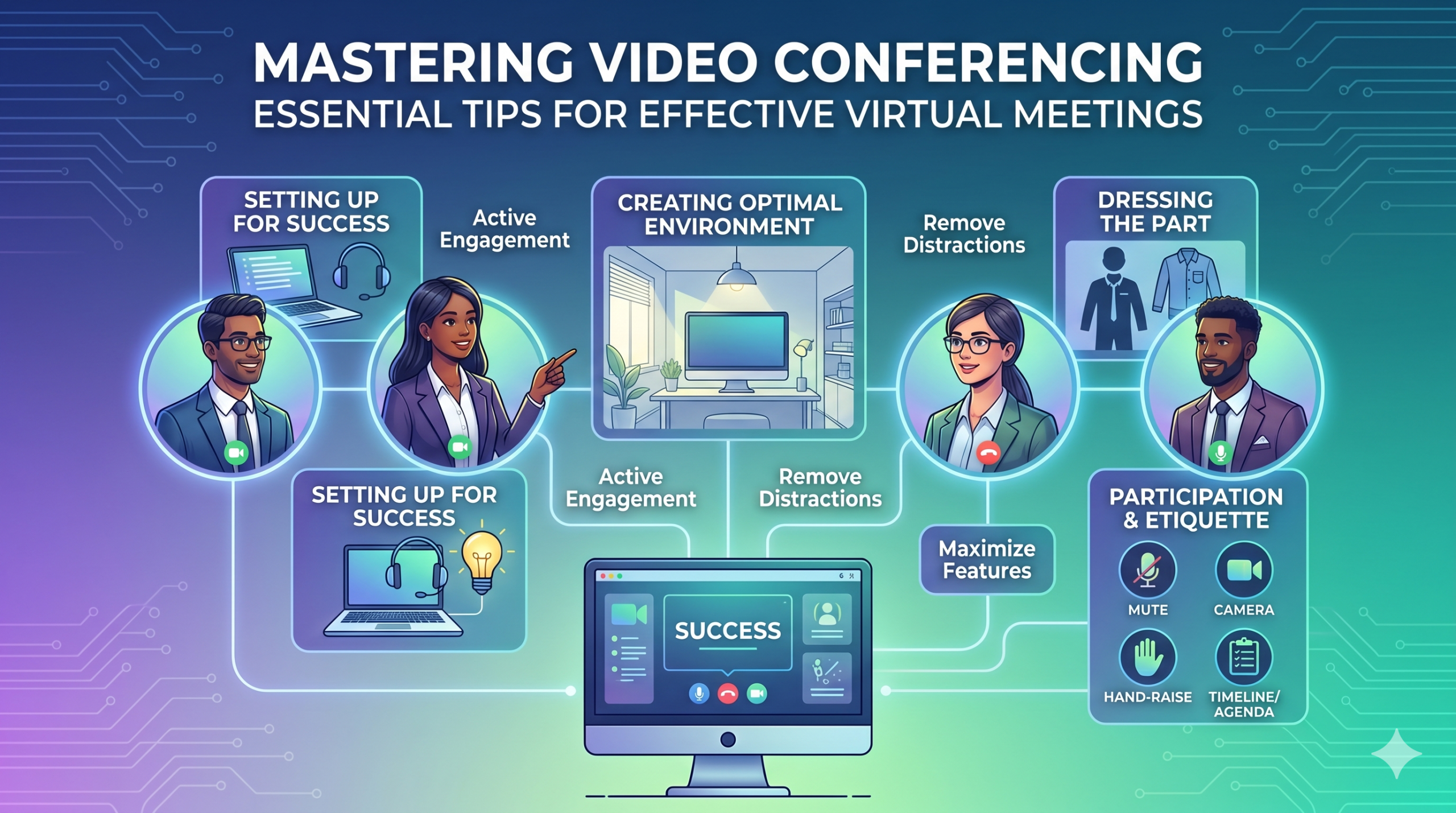

Technologie heeft de manier waarop bedrijven snel opereren veranderd, en het ziet er niet naar uit dat dit snel zal vertragen. De communicatie, de bedrijfsvoering en de workflow zijn allemaal verbeterd, waardoor het gemakkelijker wordt om samen te werken, ongeacht de locatie van het bedrijf of de werknemers.
Nu is werken op afstand niet alleen een extraatje, maar een nieuwe norm, waardoor virtuele vergaderingen een noodzaak worden.
Hier is een interessant feit: Bijna 96% van de werknemers Deze videogesprekken zorgen ervoor dat hun externe teams zich meer verbonden voelen.
In virtual meetings, employees are supposed to share thoughts, talk about relevant topics, and solve problems as a team. But more often than not, things don’t go as planned.
People start to tune out, conversations go off track, meetings go over time, and some participants aren’t engaged. The result? We’re left with a lot of room for improvement for virtual meetings to be truly productive and effective.
On the flip side, when meetings go well, there’s a positive vibe in the team, everyone understands their expectations and responsibilities, and productivity and efficiency increase.
That’s what the goal of a great video conference is, every time.
In this article, we’ll share some of the best video conferencing tips to help you achieve more success in your collaborative effects. So read on.
Opzetten voor succes
Now that so many of us are partaking in video conferences more frequently, making oneself appear and sound professional isn’t always easy when seated in PJs from the waist down.
We zijn waarschijnlijk allemaal getuige geweest van en hebben bijgedragen aan enkele minder dan ideale of zelfs gênante momenten tijdens een videoconferentie.
To avoid such situations, here are some video conferencing tips that’ll help you set up for success from the start:
Het juiste gereedschap kiezen
Allereerst: het platform dat u kiest, kan echt een verschil maken in de manier waarop uw teams dingen gedaan krijgen.
Als u voor de verkeerde kiest, kunt u problemen tegenkomen zoals langdurige, trage en complexe instellingen voor vergaderingen, mensen die moeite hebben om aan uw evenement deel te nemen, niet weten wie er kwam opdagen, of beperkte hulpmiddelen hebben om informatie te presenteren en te communiceren.
To make the right call on the tool to use, figure out what’s most important for your team.
Misschien heb je een platform nodig dat goed in je webbrowser werkt, supereenvoudig te starten is en weinig complexiteit in de interface heeft. Misschien ben je op zoek naar whiteboards om te brainstormen of een functie waarmee vergaderingen automatisch worden vastgelegd.
Hier zijn enkele meer algemene kenmerken waar u op moet letten in een effectieve tool voor virtuele vergaderingen:
- Gemakkelijk te gebruiken: het moet voor iedereen eenvoudig te gebruiken zijn, zelfs voor tech-nieuwkomers die niet goed thuis zijn in het gebruik van software.
- Video en geluid van goede kwaliteit: Niemand wil wazige video of audio die achterblijft. Sommige tools kunnen beter omgaan met lagere Wi-Fi-signalen dan andere.
- Interactive Tools: Tools that help everyone participate and engage – like sending visual reactions, chatting and sharing documents, and more.
- Analyse: verkrijg informatie over uw vergaderingen om deze te verbeteren (tijd, deelnemersgrootte, betrokkenheidsstatistieken, enz.).
- Dekt alles wat u nodig heeft: De tool zou goed moeten werken voor, tijdens en na de vergadering voor wat u daadwerkelijk nodig heeft.
Extra tips voor effectief vergaderen
De kans is groot dat u ruim vóór uw geplande vergadering een uitnodiging voor een vergadering ontvangt. Ga vooraf naar de website of download de app en log in om te controleren of alles werkt.
Kom niet te laat voor de vergadering, alleen maar omdat u probeerde een wachtwoord te onthouden om in te loggen of door een aantal 'Toestemming vereist'-prompts te navigeren om toegang te krijgen tot uw camera en microfoon.
Op de meeste sites voor videoconferenties kunt u een testvergadering organiseren om eventuele knikken in uw hardware op te lossen, bijvoorbeeld als u ontdekt dat uw webcam niet werkt of dat uw microfoon te stil is tijdens de videoconferentie.
Een optimale omgeving creëren
U weet misschien hoe u er goed uit kunt zien tijdens videogesprekken, maar hoe zit het met uw videoconferentieachtergrond? Het kan veel over je zeggen, en niet altijd op een goede manier.
Hier volgen enkele eenvoudige tips voor videoconferenties om ervoor te zorgen dat uw omgeving in een professionele omgeving de juiste boodschap overbrengt:
- Get the Lighting Right: Good lighting makes you look professional. Use natural light from a window. Or go for soft and even lighting. Just don’t have too much light behind you.
- Keep the Background Simple: Don’t clutter your background with too many items. Keep it tidy and neutral. You can add a few personal items for a friendly touch.
- Versier opzettelijk: Als u een plank of boekenkast op de achtergrond heeft, laat dan onderscheidingen of notities zien die verband houden met de vergadering. Maak het doelgericht.
- Vermijd deuren en ramen: Richt uw camera weg van deuren en ramen om afleiding en verlichtingsproblemen te voorkomen.
- Position Your Webcam Right: Place your webcam at eye level, three to eight feet away from you. That’ll help you avoid distortions.
- Create a Permanent Setup: Designate a spot for video calls so you don’t scramble every time. You can use a fabric or paper backdrop for convenience.
- Gebruik webcamvoorbeeld: controleer hoe alles er op de camera uitziet voordat u belt. Breng indien nodig aanpassingen aan.
Houd er rekening mee dat als er iets onverwachts gebeurt (zoals uw peuter die binnenstormt), u rustig moet blijven en uw professionaliteit moet behouden. Uw energie draagt ook bij aan het ‘milieu’, dus zorg ervoor dat u uw kalmte niet verliest.
Presentatie en betrokkenheid
Het onderdeel aankleden
Kleed u correct voor professionele bijeenkomsten.
We’ve all had those days when working from home meant staying in pajamas for most of the day. It’s all good if you don’t have any video meetings. But when you do, it’s a big no-no for you and everyone else on the call.
Draag werkgeschikte kleding.
You and your team should look the part for virtual meetings, even if it’s casual. You don’t need to wear a suit or a fancy dress but avoid wearing anything you wouldn’t wear at the office. Also, it’s a bit tricky to feel like you’re working when you’re in the same clothes you crashed out in.
You have a choice, though. You can look professional on top and keep comfy sweatpants or leggings on the bottom, out of sight. It’s your call, but being fully dressed might help you keep your head in the game.
Actieve deelname
Kijk rechtstreeks in de camera.
Many participants make this slip-up—they look at the video screen instead of the camera when talking to someone online. It might feel natural, but it actually makes you seem like you’re not fully engaged.
It can make you look a bit distant and not so professional. And it’s pretty obvious when you’re not all there during a video call.
Denk er zo over na: looking right into the camera lens is like looking someone in the eye when talking face-to-face. If someone talking to you in real life looks elsewhere instead of keeping eye contact, you’d think they are not interested in what you’re saying, right?
Looking directly into the camera is one of the basic video meeting etiquette. So, give it a go until you get the hang of it. It’ll make you seem more connected and professional during your virtual meetings.
Also, shut down all the extra apps and tabs you don’t need and turn off those pesky notifications that can distract you and your mates.
Demp jezelf als je niet praat.
People can often tune out background noise on their end, but it’s tough to ignore when you’re on the receiving end of the call.
Nobody’s keen to listen to your cat’s meow in the background. And if they do, you might find the meeting topic shifting to “What cat breed is that? She’s gorgeous!”
Unmuted people can be quite distracting and take the meeting off track. So, let’s make a rule: keep yourself muted unless you are about to speak for a better video conference.
Spreek nooit boven anderen uit.
Things can get pretty tricky when you have a bunch of people on the same video call. Be patient, and do not jump in while others are talking—it’s rude and against conference call etiquette.
Bewaar uw vragen tot het einde, zodat iedereen de kans krijgt om zijn of haar gedachten te delen. Er zijn maar weinig dingen die zo ontmoedigend zijn als voortdurend onderbroken en besproken worden, vooral als je iets echt waardevols te delen hebt
Betrek deelnemers op afstand met behulp van technologie.
U wilt dat deelnemers aan uw onlinevergaderingen zich betrokken en op hun gemak voelen. Volgens een conferentie rapport, two big issues for remote workers during conference calls are not wanting to interrupt others and not seeing everyone’s faces.
Verbeter de kwaliteit van de videogesprekken om uw virtuele conferentie toegankelijker te maken.
Plaats ook uw microfoon en camera op de juiste manier, gebruik ondertiteling en zorg voor een inbeloptie via de telefoon. Zorg ervoor dat gedeelde documenten gemakkelijk zichtbaar zijn voor alle deelnemers.
Transformeer uw vergaderdeelnemers van passieve waarnemers in actieve deelnemers. Stimuleer creativiteit met whiteboards, besluitvorming met opiniepeilingen, het delen van meningen via chat en het uiten van reacties met leuke emoji's in uw virtuele vergaderingen
Etiquette en overwegingen
Tijdbeheer
Wees punctueel – wees altijd op tijd.
This rule applies to all kinds of meetings—in person, on video, or a mix of both. But it’s one of the must-follow video conference best practices in particular. You see, making those personal connections is tougher through screens. Even though tech helps, it’s pointless if you’re absent. So, be there for your colleagues and respect their time.
Houd bij het plannen rekening met tijdzones.
U kunt misschien niet iedereen bij elke virtuele vergadering betrekken, maar u kunt er wel voor zorgen dat iedereen de kans krijgt om deel te nemen.
One of the tips for video conferencing to consider is to just think about when people are usually busy with their work, where they’re located, and what time zone they’re in. Then, plan your meetings to fit around these factors so that everyone can be a part of it.
Verstuur voorafgaand aan de vergadering een agenda.
Keep things simple and clear when you’re getting ready for a meeting. Ensure you’ve got a clear idea of what you want to achieve, and share the plan with your team in advance. This allows everyone to think about what they want to say or ask, setting the foundation for a successful video conference.
Om georganiseerd te blijven, kunt u een planning opnemen in uw vergaderagenda. Dit helpt u op koers te blijven en niet af te dwalen. Reserveer wat tijd om de vergadering te beginnen met een gezellig praatje; dit draagt bij aan het opbouwen van een positieve sfeer.
Afleidingsvrij blijven
Verwijder mogelijke afleidingen uit uw omgeving.
When you’re right in the thick of a busy workday, you might feel like having a go at doing other things during a video call. But humans aren’t that great at multitasking—only about 2,5% van de mensen kan dit voor elkaar krijgen.
Als u te veel tegelijk probeert te doen, kunt u zich gestrest voelen en uw focus verliezen. Bovendien kan het behoorlijk afleidend zijn voor uw teamgenoten tijdens het telefoongesprek. Hier zijn dus de protocollen voor videoconferenties die u moet volgen:
- Sluit al het andere werk op uw computer.
- Plaats het videogesprek en de webcam vlak voor u als u meerdere schermen heeft.
- Zet die meldingen op uw computer en telefoon stil.
- Weersta de drang om tijdens het gesprek sociale media te bekijken.
- If you’re working from home with the family around, give them a heads up that you’re on a call so they don’t come barging in.
Besteed altijd uw volledige aandacht aan de vergadering.
Avoid the urge to check emails or tinker with your PowerPoint during video calls; it’s just not good video conference etiquette. Similar to face-to-face meetings, showing respect to your colleagues by giving them your full attention is necessary.
Here’s one of the top video conferencing tips: If you wouldn’t do a particular action in person, don’t do it during a virtual meet-up.
Conclusie: Maximaliseer de videoconferentiefuncties
Teamwerk betekent samenwerken, belangrijke zaken bespreken en streven naar goede resultaten. Virtuele vergaderingen zouden precies zo moeten zijn.
Check out your virtual meeting tool’s reports to see how people got involved and what they liked best. You’ve hit the jackpot if the reports say that participants were all about the polls, questions, upvotes, and chats.
Use video tools to get your team chatting, steer them toward group goals, and ensure everyone has a positive vibe. That’s one of the top-secret tips for video conferencing.