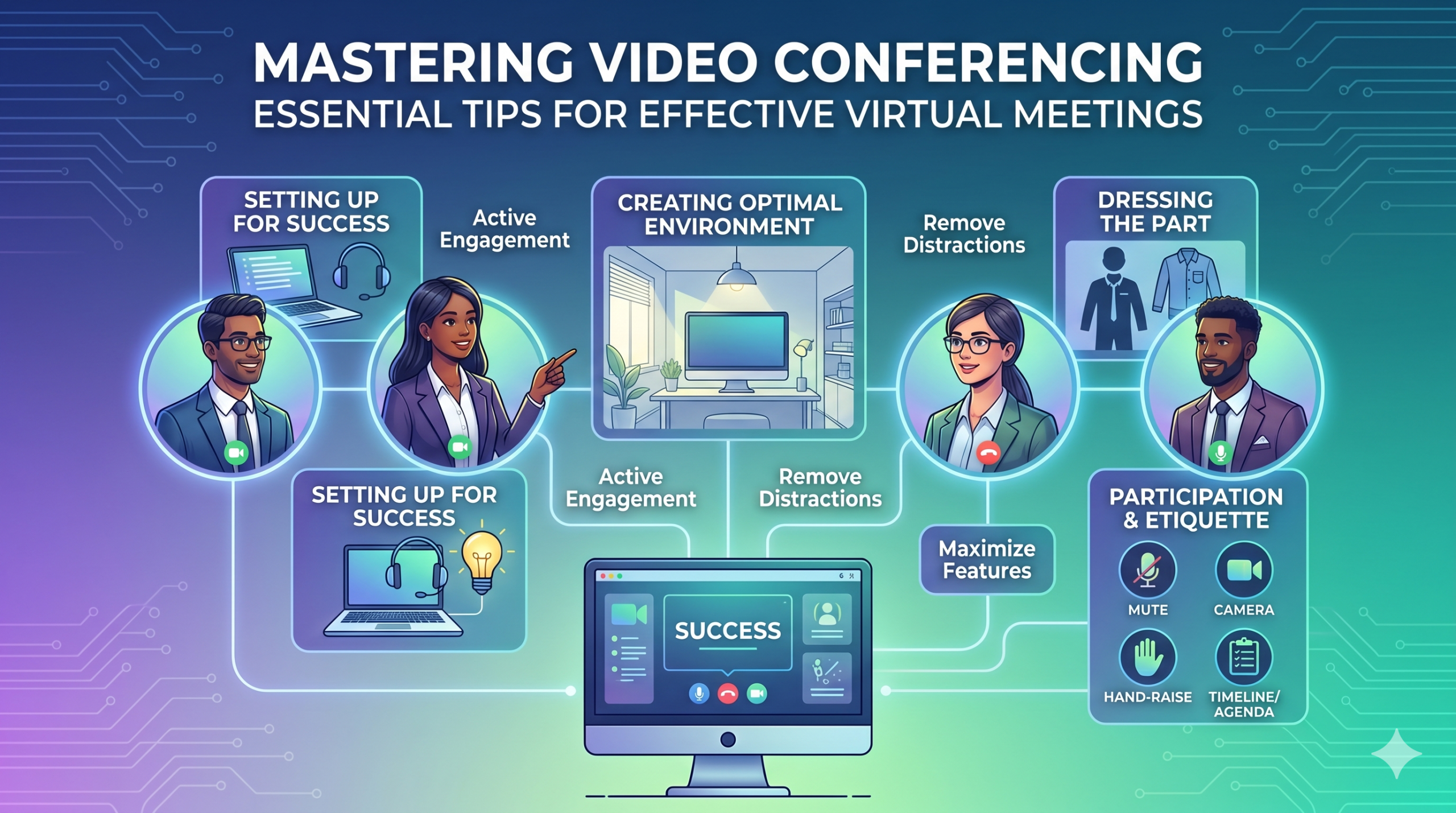

प्रौद्योगिकी व्यवसायों के संचालन के तरीके को तेजी से बदल रही है, और ऐसा नहीं लगता कि यह जल्द ही धीमा हो जाएगा। संचार, संचालन और वर्कफ़्लो सभी में सुधार हुआ है, जिससे कंपनी या कर्मचारियों का स्थान चाहे कुछ भी हो, सहयोगात्मक रूप से काम करना आसान हो गया है।
अब, दूरस्थ कार्य केवल एक लाभ नहीं है, बल्कि एक नया मानदंड है, जिससे आभासी बैठकें एक आवश्यकता बन गई हैं।
यहाँ एक दिलचस्प तथ्य है: लगभग 96% कर्मचारी कहा गया कि वीडियो कॉल से उनकी दूरस्थ टीमों को अधिक जुड़ाव महसूस करने में मदद मिलती है।
In virtual meetings, employees are supposed to share thoughts, talk about relevant topics, and solve problems as a team. But more often than not, things don’t go as planned.
People start to tune out, conversations go off track, meetings go over time, and some participants aren’t engaged. The result? We’re left with a lot of room for improvement for virtual meetings to be truly productive and effective.
On the flip side, when meetings go well, there’s a positive vibe in the team, everyone understands their expectations and responsibilities, and productivity and efficiency increase.
That’s what the goal of a great video conference is, every time.
In this article, we’ll share some of the best video conferencing tips to help you achieve more success in your collaborative effects. So read on.
सफलता के लिए तैयारी
Now that so many of us are partaking in video conferences more frequently, making oneself appear and sound professional isn’t always easy when seated in PJs from the waist down.
संभवतः हम सभी ने कॉन्फ्रेंसिंग वीडियो के दौरान कुछ आदर्श से कम, या यहां तक कि शर्मनाक क्षणों को देखा और योगदान दिया है।
To avoid such situations, here are some video conferencing tips that’ll help you set up for success from the start:
सही उपकरण चुनना
सबसे पहले चीज़ें- आपके द्वारा चुना गया प्लेटफ़ॉर्म वास्तव में आपकी टीमों के काम करने के तरीके में अंतर ला सकता है।
यदि आप गलत विकल्प अपनाते हैं, तो आपको बैठकों के लिए लंबी, धीमी और जटिल व्यवस्था, आपके कार्यक्रम में शामिल होने के लिए लोगों को संघर्ष करना, यह नहीं पता होना कि कौन आया, या जानकारी प्रस्तुत करने और बातचीत करने के लिए सीमित उपकरण होना जैसी समस्याओं का सामना करना पड़ सकता है।
To make the right call on the tool to use, figure out what’s most important for your team.
हो सकता है कि आपको एक ऐसे प्लेटफ़ॉर्म की आवश्यकता हो जो आपके वेब ब्राउज़र में ठीक से काम करता हो, लॉन्च करना बहुत आसान हो और इंटरफ़ेस में थोड़ी जटिलता हो। शायद आप विचार-मंथन के लिए व्हाइटबोर्ड या किसी ऐसे फ़ंक्शन की तलाश में हैं जो बैठकों को स्वचालित रूप से रिकॉर्ड करता हो।
प्रभावी वर्चुअल मीटिंग टूल में देखने के लिए यहां कुछ और सामान्य विशेषताएं दी गई हैं:
- उपयोग में आसान: इसका उपयोग करना हर किसी के लिए सरल होना चाहिए - यहां तक कि तकनीकी नौसिखियों के लिए भी जो सॉफ़्टवेयर उपयोग में अच्छी तरह से वाकिफ नहीं हैं।
- अच्छी गुणवत्ता वाला वीडियो और ध्वनि: कोई भी अस्पष्ट वीडियो या ऑडियो नहीं चाहता जो धीमा हो। कुछ उपकरण दूसरों की तुलना में कम वाई-फाई सिग्नल को बेहतर ढंग से संभालते हैं।
- Interactive Tools: Tools that help everyone participate and engage – like sending visual reactions, chatting and sharing documents, and more.
- एनालिटिक्स: अपनी बैठकों को बेहतर बनाने के लिए उनके बारे में जानकारी प्राप्त करें (समय, प्रतिभागियों का आकार, सहभागिता आँकड़े, आदि)।
- आपकी ज़रूरत की हर चीज़ को कवर करता है: आपको वास्तव में जिस चीज़ की ज़रूरत है उसके लिए टूल को मीटिंग से पहले, उसके दौरान और बाद में अच्छी तरह से काम करना चाहिए।
प्रभावी कॉन्फ्रेंसिंग के लिए अतिरिक्त युक्तियाँ
संभावना है कि आपको अपनी निर्धारित मीटिंग से काफी पहले मीटिंग का निमंत्रण मिल जाएगा। यह सुनिश्चित करने के लिए कि सब कुछ काम कर रहा है, वेबसाइट पर जाएं या ऐप पहले से डाउनलोड करें और लॉग इन करें।
मीटिंग के लिए सिर्फ इसलिए देर न करें क्योंकि आप लॉग इन करने के लिए पासवर्ड याद रखने की कोशिश कर रहे थे या अपने कैमरे और माइक्रोफ़ोन तक पहुंचने के लिए "अनुमति आवश्यक" संकेतों का एक समूह नेविगेट कर रहे थे।
अधिकांश वीडियो कॉन्फ्रेंसिंग साइटें आपको अपने हार्डवेयर में किसी भी गड़बड़ी को दूर करने के लिए एक परीक्षण मीटिंग बनाने की अनुमति देती हैं, जैसे यह पता लगाना कि आपका वेबकैम काम नहीं कर रहा है या कॉन्फ्रेंसिंग वीडियो के दौरान आपका माइक्रोफ़ोन बहुत शांत है।
एक इष्टतम वातावरण बनाना
आप शायद जानते होंगे कि वीडियो कॉल पर अच्छा कैसे दिखना है, लेकिन आपकी वीडियो कॉन्फ़्रेंस पृष्ठभूमि के बारे में क्या? यह आपके बारे में बहुत कुछ कह सकता है, और हमेशा अच्छे तरीके से नहीं।
यह सुनिश्चित करने के लिए कि आपका वातावरण पेशेवर सेटिंग में सही संदेश भेजता है, वीडियो कॉन्फ्रेंसिंग के लिए यहां कुछ सरल युक्तियां दी गई हैं:
- Get the Lighting Right: Good lighting makes you look professional. Use natural light from a window. Or go for soft and even lighting. Just don’t have too much light behind you.
- Keep the Background Simple: Don’t clutter your background with too many items. Keep it tidy and neutral. You can add a few personal items for a friendly touch.
- जानबूझकर सजाएँ: यदि आपके पास पृष्ठभूमि में एक शेल्फ या किताबों की अलमारी है, तो बैठक से संबंधित पुरस्कार या नोट्स प्रदर्शित करें। इसे उद्देश्यपूर्ण बनाएं.
- दरवाज़ों और खिड़कियों से बचें: ध्यान भटकाने और प्रकाश संबंधी समस्याओं से बचने के लिए अपने कैमरे को दरवाज़ों और खिड़कियों से दूर रखें।
- Position Your Webcam Right: Place your webcam at eye level, three to eight feet away from you. That’ll help you avoid distortions.
- Create a Permanent Setup: Designate a spot for video calls so you don’t scramble every time. You can use a fabric or paper backdrop for convenience.
- वेबकैम पूर्वावलोकन का उपयोग करें: अपने कॉल से पहले जांचें कि कैमरे पर सब कुछ कैसा दिखता है। आवश्यकतानुसार समायोजन करें.
याद रखें, अगर कुछ अप्रत्याशित होता है (जैसे कि आपका बच्चा अंदर घुस आता है), तो शांत रहें और व्यावसायिकता बनाए रखें- आपकी ऊर्जा भी "पर्यावरण" में योगदान करती है, इसलिए अपना संयम न खोने पर ध्यान केंद्रित करें।
प्रस्तुति और सहभागिता
भाग को सजाना
पेशेवर बैठकों के लिए ठीक से कपड़े पहनें।
We’ve all had those days when working from home meant staying in pajamas for most of the day. It’s all good if you don’t have any video meetings. But when you do, it’s a big no-no for you and everyone else on the call.
काम के अनुरूप कपड़े पहनें।
You and your team should look the part for virtual meetings, even if it’s casual. You don’t need to wear a suit or a fancy dress but avoid wearing anything you wouldn’t wear at the office. Also, it’s a bit tricky to feel like you’re working when you’re in the same clothes you crashed out in.
You have a choice, though. You can look professional on top and keep comfy sweatpants or leggings on the bottom, out of sight. It’s your call, but being fully dressed might help you keep your head in the game.
सक्रिय भागीदारी
सीधे कैमरे में देखें.
Many participants make this slip-up—they look at the video screen instead of the camera when talking to someone online. It might feel natural, but it actually makes you seem like you’re not fully engaged.
It can make you look a bit distant and not so professional. And it’s pretty obvious when you’re not all there during a video call.
इस पर इस तरीके से विचार करें: looking right into the camera lens is like looking someone in the eye when talking face-to-face. If someone talking to you in real life looks elsewhere instead of keeping eye contact, you’d think they are not interested in what you’re saying, right?
Looking directly into the camera is one of the basic video meeting etiquette. So, give it a go until you get the hang of it. It’ll make you seem more connected and professional during your virtual meetings.
Also, shut down all the extra apps and tabs you don’t need and turn off those pesky notifications that can distract you and your mates.
न बोलने पर स्वयं को म्यूट कर दें।
People can often tune out background noise on their end, but it’s tough to ignore when you’re on the receiving end of the call.
Nobody’s keen to listen to your cat’s meow in the background. And if they do, you might find the meeting topic shifting to “What cat breed is that? She’s gorgeous!”
Unmuted people can be quite distracting and take the meeting off track. So, let’s make a rule: keep yourself muted unless you are about to speak for a better video conference.
कभी भी दूसरों के बारे में बात न करें.
Things can get pretty tricky when you have a bunch of people on the same video call. Be patient, and do not jump in while others are talking—it’s rude and against conference call etiquette.
अपने प्रश्नों को अंत तक सहेज कर रखें ताकि सभी को अपने विचार साझा करने का मौका मिले। कुछ चीजें लगातार बाधित होने और बात करने से ज्यादा निराशाजनक होती हैं, खासकर तब जब आपके पास साझा करने के लिए वास्तव में कुछ मूल्यवान हो
प्रौद्योगिकी का उपयोग करके दूरस्थ प्रतिभागियों को शामिल करें।
आप चाहते हैं कि आपकी ऑनलाइन मीटिंग में भाग लेने वाले शामिल और सहज महसूस करें। एक कॉन्फ्रेंसिंग के मुताबिक प्रतिवेदन, two big issues for remote workers during conference calls are not wanting to interrupt others and not seeing everyone’s faces.
अपने आभासी सम्मेलन को अधिक सुलभ बनाने के लिए, वीडियो कॉल की गुणवत्ता में सुधार करें।
इसके अलावा, अपने माइक्रोफ़ोन और कैमरे को ठीक से रखें, बंद कैप्शन का उपयोग करें और फ़ोन डायल-इन विकल्प प्रदान करें। सुनिश्चित करें कि साझा दस्तावेज़ सभी प्रतिभागियों को आसानी से दिखाई दें।
अपनी बैठक में उपस्थित लोगों को निष्क्रिय पर्यवेक्षकों से सक्रिय प्रतिभागियों में बदलें। व्हाइटबोर्ड के साथ रचनात्मकता को प्रोत्साहित करें, चुनावों के साथ निर्णय लें, चैट के माध्यम से राय साझा करें और अपनी आभासी बैठकों में मजेदार इमोजी के साथ प्रतिक्रियाएं व्यक्त करें।
शिष्टाचार और विचार
समय प्रबंधन
समय के पाबंद रहें - हमेशा समय पर रहें।
This rule applies to all kinds of meetings—in person, on video, or a mix of both. But it’s one of the must-follow video conference best practices in particular. You see, making those personal connections is tougher through screens. Even though tech helps, it’s pointless if you’re absent. So, be there for your colleagues and respect their time.
शेड्यूल करते समय समय क्षेत्र को ध्यान में रखें।
हो सकता है कि आप हर वर्चुअल मीटिंग में सभी को शामिल न कर पाएं, लेकिन आप यह सुनिश्चित कर सकते हैं कि हर किसी को कुछ में शामिल होने का मौका मिले।
One of the tips for video conferencing to consider is to just think about when people are usually busy with their work, where they’re located, and what time zone they’re in. Then, plan your meetings to fit around these factors so that everyone can be a part of it.
बैठक से पहले एक एजेंडा भेजें.
Keep things simple and clear when you’re getting ready for a meeting. Ensure you’ve got a clear idea of what you want to achieve, and share the plan with your team in advance. This allows everyone to think about what they want to say or ask, setting the foundation for a successful video conference.
व्यवस्थित रहने के लिए, अपनी मीटिंग के एजेंडे में एक शेड्यूल शामिल करें। इससे आपको ट्रैक पर बने रहने में मदद मिलती है और लक्ष्य से भटकने से बचने में मदद मिलती है। थोड़ी मित्रतापूर्ण बातचीत के साथ बैठक शुरू करने के लिए कुछ समय आवंटित करें - इससे सकारात्मक माहौल बनाने में मदद मिलती है।
व्याकुलता-मुक्त रहना
अपने वातावरण से संभावित विकर्षणों को दूर करें।
When you’re right in the thick of a busy workday, you might feel like having a go at doing other things during a video call. But humans aren’t that great at multitasking—only about 2.5% लोग इसे पूरा कर सकते हैं.
एक बार में बहुत अधिक काम करने का प्रयास करने से आप तनाव महसूस कर सकते हैं और अपना ध्यान खो सकते हैं। साथ ही, यह कॉल पर आपके साथियों के लिए काफी ध्यान भटकाने वाला हो सकता है। तो, यहां पालन करने के लिए वीडियो कॉन्फ्रेंसिंग प्रोटोकॉल हैं:
- अपने कंप्यूटर पर कोई अन्य कार्य बंद करें.
- यदि आपके पास एकाधिक स्क्रीन हैं तो उस वीडियो कॉल और वेबकैम को अपने ठीक सामने रखें।
- अपने कंप्यूटर और फ़ोन पर उन सूचनाओं को शांत करें।
- कॉल के दौरान सोशल मीडिया देखने की इच्छा से बचें।
- If you’re working from home with the family around, give them a heads up that you’re on a call so they don’t come barging in.
हमेशा मीटिंग पर पूरा ध्यान दें.
Avoid the urge to check emails or tinker with your PowerPoint during video calls; it’s just not good video conference etiquette. Similar to face-to-face meetings, showing respect to your colleagues by giving them your full attention is necessary.
Here’s one of the top video conferencing tips: If you wouldn’t do a particular action in person, don’t do it during a virtual meet-up.
निष्कर्ष: वीडियो कॉन्फ़्रेंस सुविधाओं को अधिकतम करना
टीम वर्क का अर्थ है एक साथ काम करना, महत्वपूर्ण चीजों पर चर्चा करना और अच्छे परिणामों का लक्ष्य रखना। वर्चुअल मीटिंग्स ऐसी ही होनी चाहिए.
Check out your virtual meeting tool’s reports to see how people got involved and what they liked best. You’ve hit the jackpot if the reports say that participants were all about the polls, questions, upvotes, and chats.
Use video tools to get your team chatting, steer them toward group goals, and ensure everyone has a positive vibe. That’s one of the top-secret tips for video conferencing.