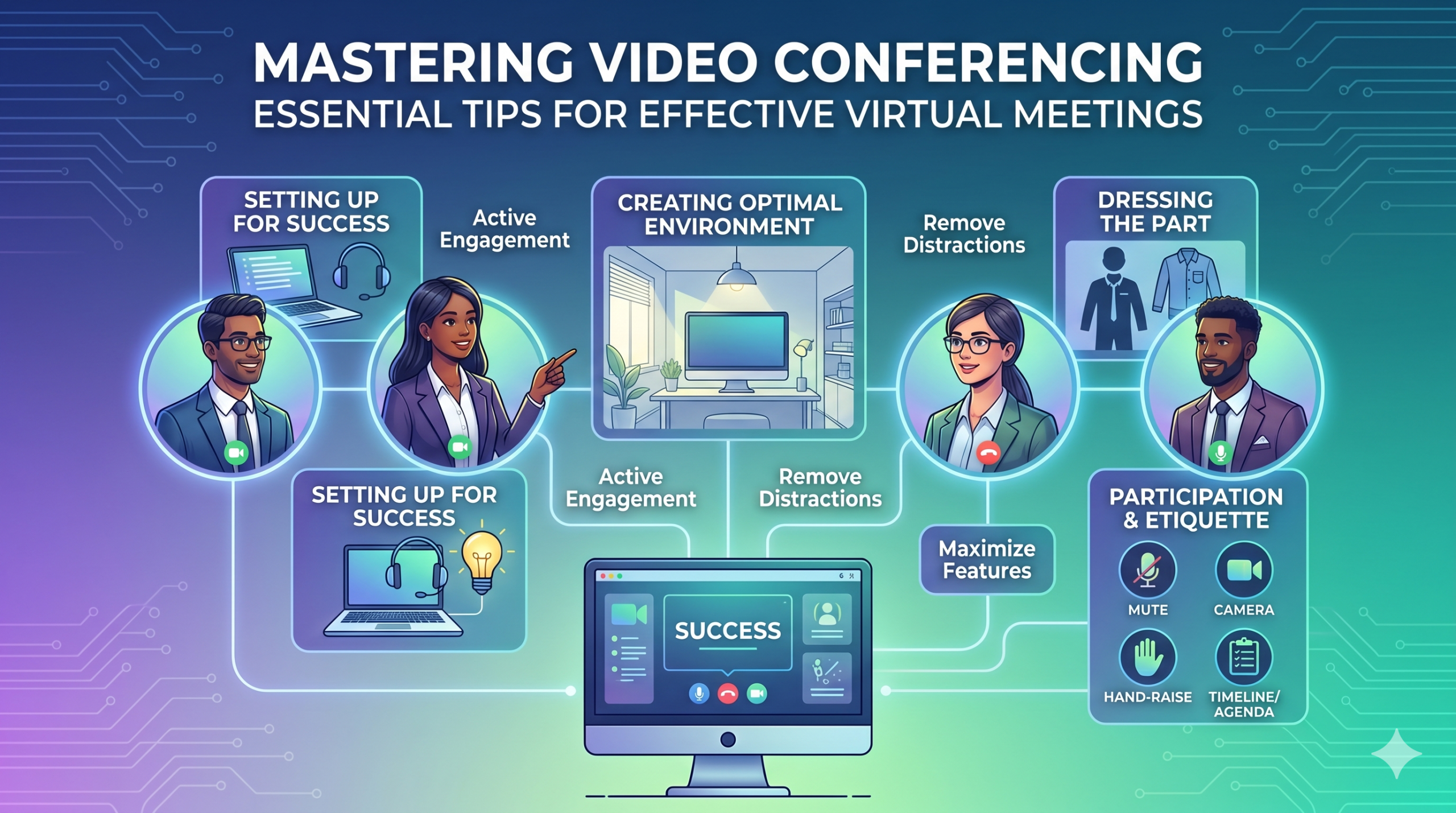

A tecnologia tem mudado a forma como as empresas operam rapidamente e não parece que irá desacelerar tão cedo. A comunicação, as operações e o fluxo de trabalho melhoraram, tornando mais fácil o trabalho colaborativo, independentemente da localização da empresa ou dos funcionários.
Agora, o trabalho remoto não é apenas uma vantagem, mas uma nova norma, tornando as reuniões virtuais uma necessidade.
Aqui está um fato interessante: Aproximadamente 96% dos funcionários disse que as videochamadas ajudam suas equipes remotas a se sentirem mais conectadas.
In virtual meetings, employees are supposed to share thoughts, talk about relevant topics, and solve problems as a team. But more often than not, things don’t go as planned.
People start to tune out, conversations go off track, meetings go over time, and some participants aren’t engaged. The result? We’re left with a lot of room for improvement for virtual meetings to be truly productive and effective.
On the flip side, when meetings go well, there’s a positive vibe in the team, everyone understands their expectations and responsibilities, and productivity and efficiency increase.
That’s what the goal of a great video conference is, every time.
In this article, we’ll share some of the best video conferencing tips to help you achieve more success in your collaborative effects. So read on.
Preparando-se para o sucesso
Now that so many of us are partaking in video conferences more frequently, making oneself appear and sound professional isn’t always easy when seated in PJs from the waist down.
Provavelmente todos nós testemunhamos e contribuímos para alguns momentos nada ideais ou até embaraçosos durante uma videoconferência.
To avoid such situations, here are some video conferencing tips that’ll help you set up for success from the start:
Escolhendo as ferramentas certas
Comecemos pelo princípio: a plataforma que você escolher pode realmente fazer a diferença na forma como suas equipes realizam as tarefas.
Se você escolher o caminho errado, poderá se deparar com problemas como configurações de reuniões demoradas, lentas e complexas, pessoas com dificuldades para participar do evento, sem saber quem apareceu ou com ferramentas limitadas para apresentar informações e interagir.
To make the right call on the tool to use, figure out what’s most important for your team.
Talvez você precise de uma plataforma que funcione direto no seu navegador, seja super simples de iniciar e tenha pouca complexidade na interface. Talvez você esteja procurando quadros brancos para brainstorming ou uma função que registre reuniões automaticamente.
Aqui estão alguns recursos mais comuns que você deve procurar em uma ferramenta de reunião virtual eficaz:
- Fácil de usar: deve ser simples de usar para todos, mesmo para novatos em tecnologia que não são versados no uso de software.
- Vídeo e som de boa qualidade: ninguém quer vídeo ou áudio confuso e com atraso. Algumas ferramentas lidam com sinais Wi-Fi mais baixos melhor do que outras.
- Interactive Tools: Tools that help everyone participate and engage – like sending visual reactions, chatting and sharing documents, and more.
- Analytics: obtenha informações sobre suas reuniões para melhorá-las (tempo, tamanho dos participantes, estatísticas de engajamento, etc.).
- Abrange tudo o que você precisa: a ferramenta deve funcionar bem antes, durante e depois da reunião para o que você realmente precisa.
Dicas extras para conferências eficazes
Provavelmente, você receberá um convite para uma reunião bem antes da reunião agendada. Acesse o site ou baixe o aplicativo previamente e faça login para garantir que tudo funciona.
Não se atrase para a reunião só porque estava tentando lembrar uma senha para fazer login ou navegando por vários prompts de “Permissão necessária” para acessar sua câmera e microfone.
A maioria dos sites de videoconferência permite que você crie uma reunião de teste para resolver quaisquer problemas em seu hardware, como descobrir que sua webcam não funciona ou que seu microfone está muito silencioso durante a videoconferência.
Criando um ambiente ideal
Você pode saber como ficar bem em videochamadas, mas e quanto ao seu histórico de videoconferência? Pode dizer muito sobre você, e nem sempre no bom sentido.
Aqui estão algumas dicas simples para videoconferência para garantir que seu ambiente envie a mensagem certa em um ambiente profissional:
- Get the Lighting Right: Good lighting makes you look professional. Use natural light from a window. Or go for soft and even lighting. Just don’t have too much light behind you.
- Keep the Background Simple: Don’t clutter your background with too many items. Keep it tidy and neutral. You can add a few personal items for a friendly touch.
- Decore intencionalmente: se você tiver uma estante ou estante ao fundo, exiba prêmios ou notas relacionadas à reunião. Faça com que seja proposital.
- Evite portas e janelas: aponte sua câmera para longe de portas e janelas para evitar distrações e problemas de iluminação.
- Position Your Webcam Right: Place your webcam at eye level, three to eight feet away from you. That’ll help you avoid distortions.
- Create a Permanent Setup: Designate a spot for video calls so you don’t scramble every time. You can use a fabric or paper backdrop for convenience.
- Use a visualização da webcam: verifique como tudo fica na câmera antes da sua chamada. Faça os ajustes necessários.
Lembre-se, se algo inesperado acontecer (como a intromissão do seu filho), mantenha a calma e mantenha o profissionalismo – a sua energia também contribui para o “ambiente”, por isso concentre-se em não perder a compostura.
Apresentação e Engajamento
Vestindo a peça
Vista-se adequadamente para reuniões profissionais.
We’ve all had those days when working from home meant staying in pajamas for most of the day. It’s all good if you don’t have any video meetings. But when you do, it’s a big no-no for you and everyone else on the call.
Use roupas adequadas ao trabalho.
You and your team should look the part for virtual meetings, even if it’s casual. You don’t need to wear a suit or a fancy dress but avoid wearing anything you wouldn’t wear at the office. Also, it’s a bit tricky to feel like you’re working when you’re in the same clothes you crashed out in.
You have a choice, though. You can look professional on top and keep comfy sweatpants or leggings on the bottom, out of sight. It’s your call, but being fully dressed might help you keep your head in the game.
Participação Ativa
Olhe diretamente para a câmera.
Many participants make this slip-up—they look at the video screen instead of the camera when talking to someone online. It might feel natural, but it actually makes you seem like you’re not fully engaged.
It can make you look a bit distant and not so professional. And it’s pretty obvious when you’re not all there during a video call.
Pense desta forma: looking right into the camera lens is like looking someone in the eye when talking face-to-face. If someone talking to you in real life looks elsewhere instead of keeping eye contact, you’d think they are not interested in what you’re saying, right?
Looking directly into the camera is one of the basic video meeting etiquette. So, give it a go until you get the hang of it. It’ll make you seem more connected and professional during your virtual meetings.
Also, shut down all the extra apps and tabs you don’t need and turn off those pesky notifications that can distract you and your mates.
Silencie-se quando não estiver falando.
People can often tune out background noise on their end, but it’s tough to ignore when you’re on the receiving end of the call.
Nobody’s keen to listen to your cat’s meow in the background. And if they do, you might find the meeting topic shifting to “What cat breed is that? She’s gorgeous!”
Unmuted people can be quite distracting and take the meeting off track. So, let’s make a rule: keep yourself muted unless you are about to speak for a better video conference.
Nunca fale sobre os outros.
Things can get pretty tricky when you have a bunch of people on the same video call. Be patient, and do not jump in while others are talking—it’s rude and against conference call etiquette.
Salve suas perguntas até o final para que todos tenham a chance de compartilhar suas ideias. Poucas coisas são mais desanimadoras do que ser constantemente interrompido e comentado, especialmente quando você tem algo realmente valioso para compartilhar.
Envolva participantes remotos usando tecnologia.
Você deseja que os participantes de suas reuniões online se sintam incluídos e confortáveis. De acordo com uma conferência relatório, two big issues for remote workers during conference calls are not wanting to interrupt others and not seeing everyone’s faces.
Para tornar sua conferência virtual mais acessível, melhore a qualidade da videochamada.
Além disso, posicione o microfone e a câmera corretamente, use legendas ocultas e forneça uma opção de discagem por telefone. Garanta que os documentos compartilhados sejam facilmente visíveis para todos os participantes.
Transforme os participantes da sua reunião de observadores passivos em participantes ativos. Incentive a criatividade com quadros brancos, a tomada de decisões com enquetes, o compartilhamento de opiniões via chat e a expressão de reações com emojis divertidos em suas reuniões virtuais
Etiqueta e considerações
Gerenciamento de tempo
Seja pontual – esteja sempre na hora certa.
This rule applies to all kinds of meetings—in person, on video, or a mix of both. But it’s one of the must-follow video conference best practices in particular. You see, making those personal connections is tougher through screens. Even though tech helps, it’s pointless if you’re absent. So, be there for your colleagues and respect their time.
Lembre-se dos fusos horários ao agendar.
Talvez você não consiga incluir todos em todas as reuniões virtuais, mas pode garantir que todos tenham a chance de participar de algumas.
One of the tips for video conferencing to consider is to just think about when people are usually busy with their work, where they’re located, and what time zone they’re in. Then, plan your meetings to fit around these factors so that everyone can be a part of it.
Envie uma agenda antes da reunião.
Keep things simple and clear when you’re getting ready for a meeting. Ensure you’ve got a clear idea of what you want to achieve, and share the plan with your team in advance. This allows everyone to think about what they want to say or ask, setting the foundation for a successful video conference.
Para se manter organizado, inclua uma programação na agenda da reunião. Isso ajuda você a permanecer no caminho certo e a não sair pela tangente. Reserve algum tempo para iniciar a reunião com um bate-papo amigável – isso ajuda a criar uma atmosfera positiva.
Ficar livre de distrações
Remova possíveis distrações do seu ambiente.
When you’re right in the thick of a busy workday, you might feel like having a go at doing other things during a video call. But humans aren’t that great at multitasking—only about 2,5% das pessoas conseguem fazer isso.
Tentar fazer muitas coisas ao mesmo tempo pode deixá-lo estressado e perder o foco. Além disso, pode distrair bastante seus colegas de equipe na chamada. Então, aqui estão os protocolos de videoconferência a serem seguidos:
- Feche qualquer outro trabalho no seu computador.
- Posicione a videochamada e a webcam bem à sua frente se você tiver várias telas.
- Silencie essas notificações no seu computador e telefone.
- Resista à tentação de verificar as redes sociais durante a ligação.
- If you’re working from home with the family around, give them a heads up that you’re on a call so they don’t come barging in.
Sempre preste total atenção à reunião.
Avoid the urge to check emails or tinker with your PowerPoint during video calls; it’s just not good video conference etiquette. Similar to face-to-face meetings, showing respect to your colleagues by giving them your full attention is necessary.
Here’s one of the top video conferencing tips: If you wouldn’t do a particular action in person, don’t do it during a virtual meet-up.
Conclusão: Maximizando os recursos de videoconferência
Trabalho em equipe significa trabalhar em conjunto, discutir coisas importantes e almejar bons resultados. As reuniões virtuais deveriam ser assim mesmo.
Check out your virtual meeting tool’s reports to see how people got involved and what they liked best. You’ve hit the jackpot if the reports say that participants were all about the polls, questions, upvotes, and chats.
Use video tools to get your team chatting, steer them toward group goals, and ensure everyone has a positive vibe. That’s one of the top-secret tips for video conferencing.