
הטכנולוגיה שינתה את האופן שבו עסקים פועלים במהירות, ולא נראה שהיא תאט בקרוב. התקשורת, התפעול וזרימת העבודה השתפרו, מה שמקל על עבודה משותפת, ללא קשר למיקום החברה או העובדים.
כעת, עבודה מרחוק היא לא רק הטבה אלא נורמה חדשה, מה שהופך פגישות וירטואליות להכרח.
הנה עובדה מעניינת: כמעט 96% מהעובדים אמרו ששיחות וידאו עוזרות לצוותים המרוחקים שלהם להרגיש מחוברים יותר.
In virtual meetings, employees are supposed to share thoughts, talk about relevant topics, and solve problems as a team. But more often than not, things don’t go as planned.
People start to tune out, conversations go off track, meetings go over time, and some participants aren’t engaged. The result? We’re left with a lot of room for improvement for virtual meetings to be truly productive and effective.
On the flip side, when meetings go well, there’s a positive vibe in the team, everyone understands their expectations and responsibilities, and productivity and efficiency increase.
That’s what the goal of a great video conference is, every time.
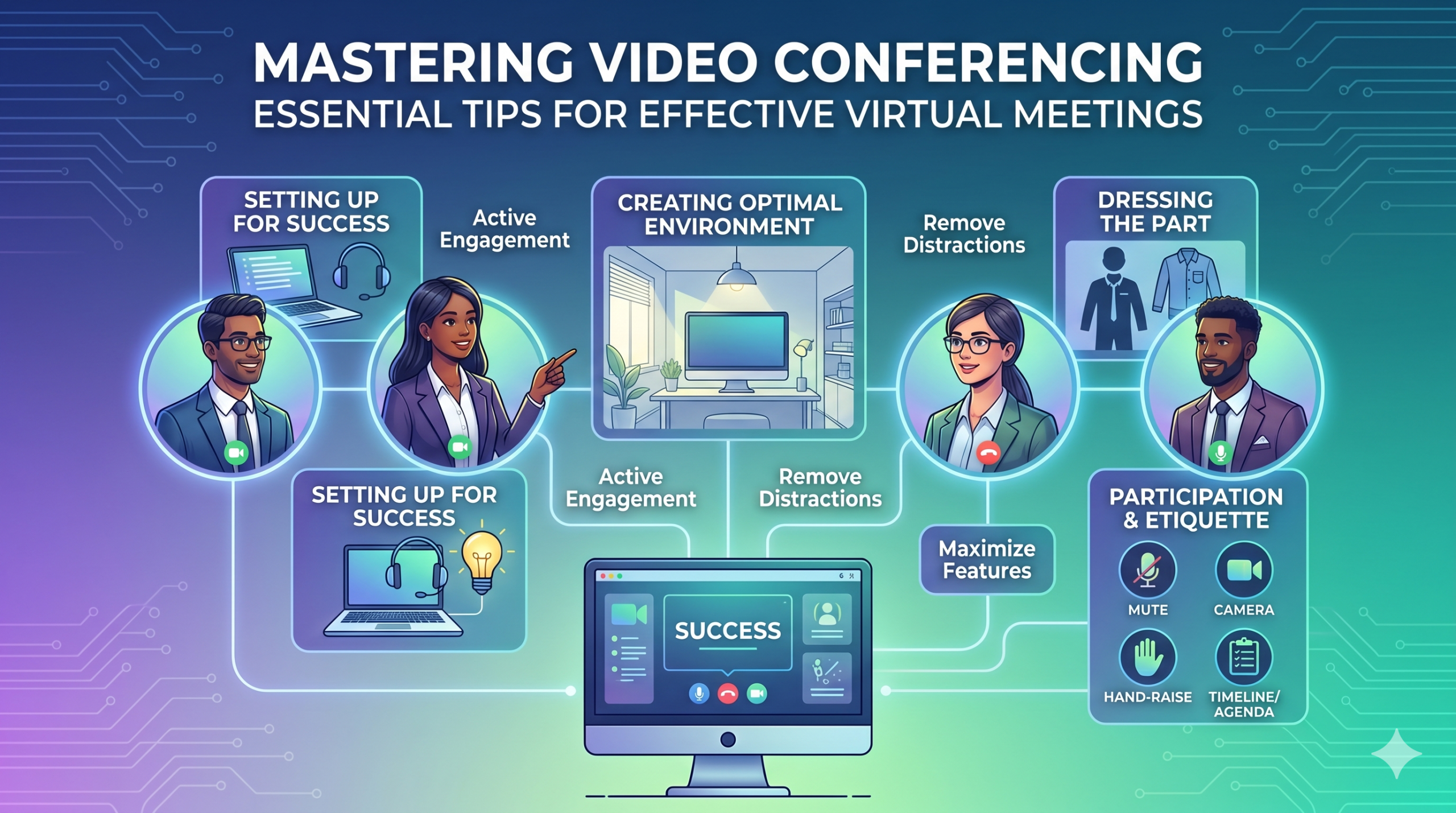
In this article, we’ll share some of the best video conferencing tips to help you achieve more success in your collaborative effects. So read on.
הגדרה להצלחה
Now that so many of us are partaking in video conferences more frequently, making oneself appear and sound professional isn’t always easy when seated in PJs from the waist down.
סביר להניח שכולנו עדים ותרמנו לכמה רגעים פחות אידיאליים או אפילו מביכים במהלך סרטון ועידה.
To avoid such situations, here are some video conferencing tips that’ll help you set up for success from the start:
בחירת הכלים הנכונים
דבר ראשון - הפלטפורמה שתבחר יכולה באמת לעשות הבדל באופן שבו הצוותים שלך מבצעים דברים.
אם אתה הולך עם האחד הלא נכון, אתה עלול להיתקל בבעיות כמו הגדרות ארוכות, איטיות ומורכבות לפגישות, אנשים שמתקשים להצטרף לאירוע שלך, לא יודעים מי הופיע, או שיש להם כלים מוגבלים להציג מידע ואינטראקציה.
To make the right call on the tool to use, figure out what’s most important for your team.
אולי אתה צריך פלטפורמה שפועלת בדיוק בדפדפן האינטרנט שלך, שהיא סופר פשוטה להפעלה, ובעלת מעט מורכבות בממשק. אולי אתה מחפש לוחות לסיעור מוחות או פונקציה שמתעדת פגישות באופן אוטומטי.
הנה כמה תכונות נפוצות יותר לחפש בכלי פגישות וירטואלי יעיל:
- קל לשימוש: זה צריך להיות פשוט לשימוש עבור כולם - אפילו עבור טירונים טכנולוגיים שאינם בקיאים היטב בשימוש בתוכנה.
- וידאו וסאונד באיכות טובה: אף אחד לא רוצה וידאו או אודיו מעורפלים בפיגור. כלים מסוימים מטפלים באותות Wi-Fi נמוכים יותר טוב מאחרים.
- Interactive Tools: Tools that help everyone participate and engage – like sending visual reactions, chatting and sharing documents, and more.
- אנליטיקה: קבל מידע על הפגישות שלך כדי לשפר אותן (זמן, גודל משתתפים, סטטיסטיקות מעורבות וכו').
- מכסה את כל מה שאתה צריך: הכלי צריך לעבוד היטב לפני, במהלך ואחרי הפגישה עבור מה שאתה באמת צריך.
טיפים נוספים לשיחות ועידה אפקטיביות
רוב הסיכויים שתקבלו הזמנה לפגישה הרבה לפני הפגישה המתוכננת. היכנסו לאתר או הורידו את האפליקציה מראש והיכנסו כדי לוודא שהכל עובד.
אל תאחר לפגישה רק בגלל שניסית לזכור סיסמה לכניסה או ניווט חבורה של הנחיות "דרושות הרשאות" כדי לגשת למצלמה ולמיקרופון שלך.
רוב אתרי ועידת הווידאו מאפשרים לך ליצור פגישת בדיקה כדי לגהץ את כל הקמטים בחומרה שלך, כמו לגלות שהמצלמת האינטרנט שלך לא עובדת או שהמיקרופון שלך שקט מדי במהלך סרטון הוועידה.
יצירת סביבה אופטימלית
אולי אתה יודע איך להיראות נהדר בשיחות וידאו, אבל מה לגבי הרקע של ועידת הווידאו שלך? זה יכול להגיד עליך הרבה, ולא תמיד בצורה טובה.
הנה כמה טיפים פשוטים לשיחות ועידה בווידאו כדי לוודא שהסביבה שלך שולחת את המסר הנכון בסביבה מקצועית:
- Get the Lighting Right: Good lighting makes you look professional. Use natural light from a window. Or go for soft and even lighting. Just don’t have too much light behind you.
- Keep the Background Simple: Don’t clutter your background with too many items. Keep it tidy and neutral. You can add a few personal items for a friendly touch.
- קשט בכוונה: אם יש לך מדף או כוננית ברקע, הצג פרסים או הערות הקשורות לפגישה. הפוך את זה לתכלית.
- הימנע מדלתות וחלונות: כוון את המצלמה שלך הרחק מדלתות וחלונות כדי למנוע הסחות דעת ובעיות תאורה.
- Position Your Webcam Right: Place your webcam at eye level, three to eight feet away from you. That’ll help you avoid distortions.
- Create a Permanent Setup: Designate a spot for video calls so you don’t scramble every time. You can use a fabric or paper backdrop for convenience.
- השתמש בתצוגה מקדימה של מצלמת אינטרנט: בדוק איך הכל נראה במצלמה לפני השיחה שלך. בצע התאמות לפי הצורך.
זכרו, אם משהו לא צפוי קורה (כמו שהפעוט שלכם מתפרץ), הישארו רגועים ושמרו על מקצועיות - האנרגיה שלכם תורמת גם ל"סביבה", אז התמקדו בלא לאבד את שלוות הדעת.
הצגה ומעורבות
הלבשת החלק
להתלבש נכון לפגישות מקצועיות.
We’ve all had those days when working from home meant staying in pajamas for most of the day. It’s all good if you don’t have any video meetings. But when you do, it’s a big no-no for you and everyone else on the call.
ללבוש בגדים המתאימים לעבודה.
You and your team should look the part for virtual meetings, even if it’s casual. You don’t need to wear a suit or a fancy dress but avoid wearing anything you wouldn’t wear at the office. Also, it’s a bit tricky to feel like you’re working when you’re in the same clothes you crashed out in.
You have a choice, though. You can look professional on top and keep comfy sweatpants or leggings on the bottom, out of sight. It’s your call, but being fully dressed might help you keep your head in the game.
השתתפות פעילה
הסתכל ישירות לתוך המצלמה.
Many participants make this slip-up—they look at the video screen instead of the camera when talking to someone online. It might feel natural, but it actually makes you seem like you’re not fully engaged.
It can make you look a bit distant and not so professional. And it’s pretty obvious when you’re not all there during a video call.
תחשוב על זה ככה: looking right into the camera lens is like looking someone in the eye when talking face-to-face. If someone talking to you in real life looks elsewhere instead of keeping eye contact, you’d think they are not interested in what you’re saying, right?
Looking directly into the camera is one of the basic video meeting etiquette. So, give it a go until you get the hang of it. It’ll make you seem more connected and professional during your virtual meetings.
Also, shut down all the extra apps and tabs you don’t need and turn off those pesky notifications that can distract you and your mates.
השתיק את עצמך כשאתה לא מדבר.
People can often tune out background noise on their end, but it’s tough to ignore when you’re on the receiving end of the call.
Nobody’s keen to listen to your cat’s meow in the background. And if they do, you might find the meeting topic shifting to “What cat breed is that? She’s gorgeous!”
Unmuted people can be quite distracting and take the meeting off track. So, let’s make a rule: keep yourself muted unless you are about to speak for a better video conference.
לעולם אל תדבר על אחרים.
Things can get pretty tricky when you have a bunch of people on the same video call. Be patient, and do not jump in while others are talking—it’s rude and against conference call etiquette.
שמור את השאלות שלך עד הסוף כדי שכולם יקבלו הזדמנות לחלוק את מחשבותיהם. מעטים דברים מרתיעים יותר מאשר להפריע כל הזמן ולדבר עליהם, במיוחד כשיש לך משהו חשוב באמת לחלוק
מעורב משתתפים מרוחקים באמצעות טכנולוגיה.
אתה רוצה שהמשתתפים בפגישות המקוונות שלך ירגישו כלולים ונוחים. על פי ועידה דִוּוּחַ, two big issues for remote workers during conference calls are not wanting to interrupt others and not seeing everyone’s faces.
כדי להפוך את הוועידה הוירטואלית שלך לנגישה יותר, שפר את איכות שיחת הווידאו.
כמו כן, מקם את המיקרופון והמצלמה שלך כראוי, השתמש בכתוביות וספק אפשרות לכניסה לטלפון. ודא שמסמכים משותפים יהיו גלויים בקלות לכל המשתתפים.
הפוך את המשתתפים בפגישה שלך מצופים פסיביים למשתתפים פעילים. עודדו יצירתיות עם לוחות ציור, קבלת החלטות עם סקרים, שיתוף דעות באמצעות צ'אט והבעת תגובות עם אימוג'ים מהנים בפגישות הוירטואליות שלכם
נימוס ושיקולים
ניהול זמן
עמדו בזמנים - עמדו תמיד בזמן.
This rule applies to all kinds of meetings—in person, on video, or a mix of both. But it’s one of the must-follow video conference best practices in particular. You see, making those personal connections is tougher through screens. Even though tech helps, it’s pointless if you’re absent. So, be there for your colleagues and respect their time.
זכור אזורי זמן בעת תזמון.
אולי לא תוכל לכלול את כולם בכל פגישה וירטואלית, אבל אתה יכול לוודא שלכולם תהיה הזדמנות להצטרף לכמה.
One of the tips for video conferencing to consider is to just think about when people are usually busy with their work, where they’re located, and what time zone they’re in. Then, plan your meetings to fit around these factors so that everyone can be a part of it.
שלח סדר יום לפני הפגישה.
Keep things simple and clear when you’re getting ready for a meeting. Ensure you’ve got a clear idea of what you want to achieve, and share the plan with your team in advance. This allows everyone to think about what they want to say or ask, setting the foundation for a successful video conference.
כדי להישאר מאורגן, כלול לוח זמנים בסדר היום של הפגישה שלך. זה עוזר לך להישאר על המסלול ולא ללכת על משיקים. הקצו קצת זמן להתחיל את הפגישה עם קצת צ'אט ידידותי - זה עוזר לבנות אווירה חיובית.
להישאר ללא הסחות דעת
הסר הסחות דעת פוטנציאליות מהסביבה שלך.
When you’re right in the thick of a busy workday, you might feel like having a go at doing other things during a video call. But humans aren’t that great at multitasking—only about 2.5% מהאנשים יכולים לממש את זה.
ניסיון לעשות יותר מדי בבת אחת יכול להשאיר אותך בלחץ ולאבד את המיקוד שלך. בנוסף, זה יכול להסיח את הדעת עבור חברי הצוות שלך בשיחה. אז הנה פרוטוקולי ועידת וידאו שיש לעקוב אחריהם:
- סגור כל עבודה אחרת במחשב שלך.
- מקם את שיחת הווידאו ואת מצלמת האינטרנט ממש לפניך אם יש לך מספר מסכים.
- השתק את ההתראות האלה במחשב ובטלפון שלך.
- תתנגד לדחף לבדוק את המדיה החברתית במהלך השיחה.
- If you’re working from home with the family around, give them a heads up that you’re on a call so they don’t come barging in.
הקדישו תמיד את מלוא תשומת הלב לפגישה.
Avoid the urge to check emails or tinker with your PowerPoint during video calls; it’s just not good video conference etiquette. Similar to face-to-face meetings, showing respect to your colleagues by giving them your full attention is necessary.
Here’s one of the top video conferencing tips: If you wouldn’t do a particular action in person, don’t do it during a virtual meet-up.
מסקנה: מקסום תכונות ועידת וידאו
עבודת צוות פירושה עבודה משותפת, לדון בדברים חשובים ולכוונה לתוצאות טובות. פגישות וירטואליות צריכות להיות בדיוק ככה.
Check out your virtual meeting tool’s reports to see how people got involved and what they liked best. You’ve hit the jackpot if the reports say that participants were all about the polls, questions, upvotes, and chats.
Use video tools to get your team chatting, steer them toward group goals, and ensure everyone has a positive vibe. That’s one of the top-secret tips for video conferencing.