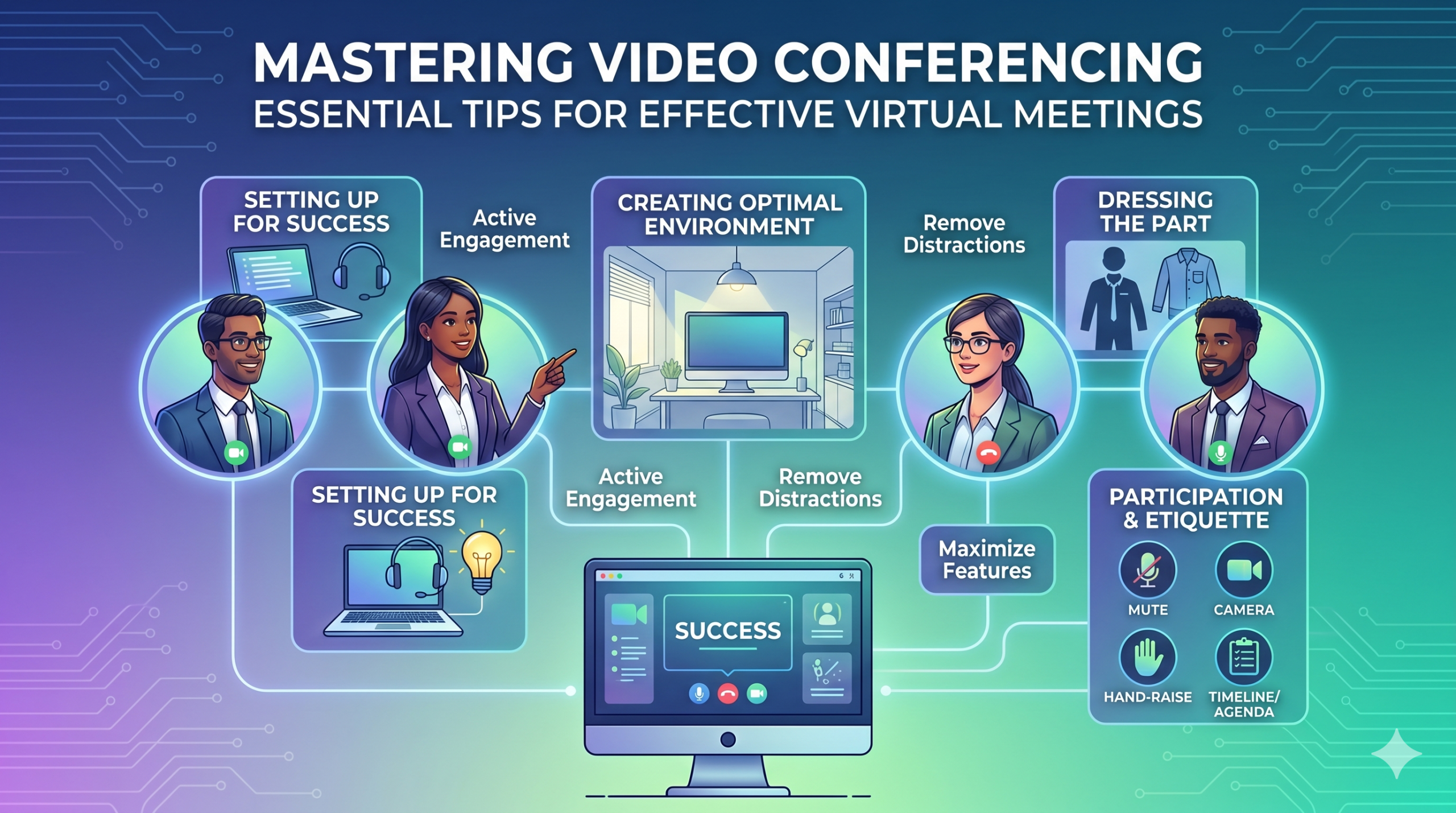

Technologijos sparčiai keičia įmonių veiklą ir neatrodo, kad jos greit sulėtės. Ryšys, operacijos ir darbo eiga pagerėjo, todėl lengviau bendradarbiauti, nepaisant įmonės ar darbuotojų buvimo vietos.
Dabar nuotolinis darbas yra ne tik privilegija, bet ir nauja norma, todėl virtualūs susitikimai yra būtinybė.
Štai įdomus faktas: Beveik 96% darbuotojų sakė, kad vaizdo skambučiai padeda jų nuotolinėms komandoms jaustis labiau susietoms.
In virtual meetings, employees are supposed to share thoughts, talk about relevant topics, and solve problems as a team. But more often than not, things don’t go as planned.
People start to tune out, conversations go off track, meetings go over time, and some participants aren’t engaged. The result? We’re left with a lot of room for improvement for virtual meetings to be truly productive and effective.
On the flip side, when meetings go well, there’s a positive vibe in the team, everyone understands their expectations and responsibilities, and productivity and efficiency increase.
That’s what the goal of a great video conference is, every time.
In this article, we’ll share some of the best video conferencing tips to help you achieve more success in your collaborative effects. So read on.
Pasiruošimas sėkmei
Now that so many of us are partaking in video conferences more frequently, making oneself appear and sound professional isn’t always easy when seated in PJs from the waist down.
Tikriausiai visi matėme ir prisidėjome prie kai kurių ne tokių idealių ar net gėdingų akimirkų per konferencijos vaizdo įrašą.
To avoid such situations, here are some video conferencing tips that’ll help you set up for success from the start:
Tinkamų įrankių pasirinkimas
Pirmiausia – jūsų pasirinkta platforma tikrai gali pakeisti jūsų komandų darbą.
Jei pasirinksite netinkamą, galite susidurti su problemomis, pvz., ilgai trunkančia, lėta ir sudėtinga susitikimų sąranka, žmonėms, kurie sunkiai prisijungia prie jūsų renginio, nežino, kas atvyko, arba ribotų įrankių informacijai pateikti ir bendrauti.
To make the right call on the tool to use, figure out what’s most important for your team.
Galbūt jums reikia platformos, kuri veiktų tiesiai jūsų žiniatinklio naršyklėje, kurią būtų labai paprasta paleisti, o sąsaja yra mažai sudėtinga. Galbūt ieškote lentų, skirtų protų šturmui, arba funkcijos, kuri automatiškai įrašo susitikimus.
Štai keletas bendresnių funkcijų, kurių reikia ieškoti efektyviame virtualių susitikimų įrankyje:
- Lengva naudoti: juo turėtų būti paprasta naudotis visiems – net ir technologijų naujokams, kurie nėra gerai išmanantys programinės įrangos naudojimo.
- Geros kokybės vaizdo ir garso: niekas nenori neryškaus vaizdo ar garso, kuris vėluoja. Kai kurie įrankiai geriau valdo žemesnius „Wi-Fi“ signalus nei kiti.
- Interactive Tools: Tools that help everyone participate and engage – like sending visual reactions, chatting and sharing documents, and more.
- Analizė: gaukite informacijos apie savo susitikimus, kad juos pagerintumėte (laiką, dalyvių skaičių, įsitraukimo statistiką ir kt.).
- Apima viską, ko jums reikia: įrankis turėtų gerai veikti prieš susitikimą, jo metu ir po jo.
Papildomi patarimai, kaip efektyviai rengti konferencijas
Tikėtina, kad kvietimą susitikti gausite gerokai prieš suplanuotą susitikimą. Eikite į svetainę arba iš anksto atsisiųskite programą ir prisijunkite, kad įsitikintumėte, jog viskas veikia.
Nevėluokite į susitikimą vien todėl, kad bandėte prisiminti slaptažodį, kad galėtumėte prisijungti, arba naršydami daugybę raginimų „Reikalingas leidimas“, kad galėtumėte pasiekti kamerą ir mikrofoną.
Daugumoje vaizdo konferencijų svetainių galite sukurti bandomąjį susitikimą, kad pašalintumėte bet kokius aparatinės įrangos gedimus, pvz., sužinotumėte, kad neveikia žiniatinklio kamera arba mikrofonas yra per tylus per konferencijos vaizdo įrašą.
Optimalios aplinkos kūrimas
Galbūt žinote, kaip puikiai atrodyti per vaizdo skambučius, bet kaip dėl vaizdo konferencijos fono? Tai gali daug pasakyti apie jus, ir ne visada gerąja prasme.
Štai keli paprasti patarimai, kaip rengti vaizdo konferencijas, kad įsitikintumėte, jog jūsų aplinka siunčia tinkamą pranešimą profesionalioje aplinkoje:
- Get the Lighting Right: Good lighting makes you look professional. Use natural light from a window. Or go for soft and even lighting. Just don’t have too much light behind you.
- Keep the Background Simple: Don’t clutter your background with too many items. Keep it tidy and neutral. You can add a few personal items for a friendly touch.
- Dekoruokite apgalvotai: jei fone yra lentyna arba knygų lentyna, rodykite apdovanojimus ar pastabas, susijusias su susitikimu. Padarykite tai tikslingai.
- Venkite durų ir langų: nukreipkite fotoaparatą toliau nuo durų ir langų, kad išvengtumėte dėmesio ir apšvietimo problemų.
- Position Your Webcam Right: Place your webcam at eye level, three to eight feet away from you. That’ll help you avoid distortions.
- Create a Permanent Setup: Designate a spot for video calls so you don’t scramble every time. You can use a fabric or paper backdrop for convenience.
- Naudokite internetinės kameros peržiūrą: prieš skambindami patikrinkite, kaip viskas atrodo fotoaparate. Jei reikia, atlikite koregavimus.
Atminkite, jei atsitiks kažkas netikėto (pvz., jūsų mažylis įsiveržia), išlikite ramūs ir išlaikykite profesionalumą – jūsų energija taip pat prisideda prie „aplinkos“, todėl sutelkite dėmesį į tai, kad neprarastumėte savitvardos.
Pristatymas ir sužadėtuvės
Dalies aprengimas
Tinkamai apsirenkite profesionaliems susitikimams.
We’ve all had those days when working from home meant staying in pajamas for most of the day. It’s all good if you don’t have any video meetings. But when you do, it’s a big no-no for you and everyone else on the call.
Dėvėkite darbui tinkamus drabužius.
You and your team should look the part for virtual meetings, even if it’s casual. You don’t need to wear a suit or a fancy dress but avoid wearing anything you wouldn’t wear at the office. Also, it’s a bit tricky to feel like you’re working when you’re in the same clothes you crashed out in.
You have a choice, though. You can look professional on top and keep comfy sweatpants or leggings on the bottom, out of sight. It’s your call, but being fully dressed might help you keep your head in the game.
Aktyvus dalyvavimas
Žiūrėkite tiesiai į kamerą.
Many participants make this slip-up—they look at the video screen instead of the camera when talking to someone online. It might feel natural, but it actually makes you seem like you’re not fully engaged.
It can make you look a bit distant and not so professional. And it’s pretty obvious when you’re not all there during a video call.
Pagalvokite apie tai taip: looking right into the camera lens is like looking someone in the eye when talking face-to-face. If someone talking to you in real life looks elsewhere instead of keeping eye contact, you’d think they are not interested in what you’re saying, right?
Looking directly into the camera is one of the basic video meeting etiquette. So, give it a go until you get the hang of it. It’ll make you seem more connected and professional during your virtual meetings.
Also, shut down all the extra apps and tabs you don’t need and turn off those pesky notifications that can distract you and your mates.
Nutildykite save, kai nekalbate.
People can often tune out background noise on their end, but it’s tough to ignore when you’re on the receiving end of the call.
Nobody’s keen to listen to your cat’s meow in the background. And if they do, you might find the meeting topic shifting to “What cat breed is that? She’s gorgeous!”
Unmuted people can be quite distracting and take the meeting off track. So, let’s make a rule: keep yourself muted unless you are about to speak for a better video conference.
Niekada nekalbėk už kitus.
Things can get pretty tricky when you have a bunch of people on the same video call. Be patient, and do not jump in while others are talking—it’s rude and against conference call etiquette.
Išsaugokite savo klausimus iki galo, kad visi turėtų galimybę pasidalinti savo mintimis. Keletas dalykų yra labiau atviliantys už nuolatinį pertraukimą ir pokalbį, ypač kai turite kuo nors tikrai vertingo, kuriuo galite pasidalinti
Įtraukite nuotolinius dalyvius naudodami technologijas.
Norite, kad jūsų internetinių susitikimų dalyviai jaustųsi įtraukti ir patogiai. Pagal konferenciją ataskaita, two big issues for remote workers during conference calls are not wanting to interrupt others and not seeing everyone’s faces.
Kad virtuali konferencija būtų prieinamesnė, pagerinkite vaizdo skambučių kokybę.
Be to, tinkamai nustatykite mikrofoną ir kamerą, naudokite subtitrus ir pateikite telefono skambinimo parinktį. Užtikrinkite, kad bendrinami dokumentai būtų lengvai matomi visiems dalyviams.
Paverskite savo susitikimo dalyvius iš pasyvių stebėtojų į aktyviais dalyviais. Skatinkite kūrybiškumą naudodami lentas, priimkite sprendimus apklausomis, dalinkitės nuomone per pokalbį ir reikškite reakcijas smagiomis emocijomis virtualiuose susitikimuose.
Etiketas ir svarstymai
Laiko valdymas
Būkite punktualus – visada laiku.
This rule applies to all kinds of meetings—in person, on video, or a mix of both. But it’s one of the must-follow video conference best practices in particular. You see, making those personal connections is tougher through screens. Even though tech helps, it’s pointless if you’re absent. So, be there for your colleagues and respect their time.
Planuodami turėkite omenyje laiko juostas.
Galbūt negalėsite įtraukti visų į kiekvieną virtualų susitikimą, bet galite užtikrinti, kad visi turės galimybę prie kai kurių prisijungti.
One of the tips for video conferencing to consider is to just think about when people are usually busy with their work, where they’re located, and what time zone they’re in. Then, plan your meetings to fit around these factors so that everyone can be a part of it.
Prieš susitikimą išsiųskite darbotvarkę.
Keep things simple and clear when you’re getting ready for a meeting. Ensure you’ve got a clear idea of what you want to achieve, and share the plan with your team in advance. This allows everyone to think about what they want to say or ask, setting the foundation for a successful video conference.
Norėdami išlaikyti tvarką, įtraukite tvarkaraštį į susitikimo darbotvarkę. Tai padeda išlikti kelyje ir nenukrypti nuo liestinių. Skirkite šiek tiek laiko susitikimui pradėti draugišku pokalbiu – tai padeda sukurti teigiamą atmosferą.
Išlikti be dėmesio
Pašalinkite galimus trukdžius iš savo aplinkos.
When you’re right in the thick of a busy workday, you might feel like having a go at doing other things during a video call. But humans aren’t that great at multitasking—only about 2,5% žmonių gali tai padaryti.
Bandydami padaryti per daug vienu metu, galite jausti įtampą ir prarasti dėmesį. Be to, tai gali labai atitraukti jūsų komandos draugus skambučio metu. Taigi, čia yra vaizdo konferencijų protokolai, kurių reikia laikytis:
- Uždarykite bet kokį kitą darbą kompiuteryje.
- Jei turite kelis ekranus, vaizdo skambutį ir internetinę kamerą pastatykite tiesiai prieš save.
- Nutildykite tuos pranešimus kompiuteryje ir telefone.
- Pokalbio metu atsispirkite norui apsilankyti socialiniuose tinkluose.
- If you’re working from home with the family around, give them a heads up that you’re on a call so they don’t come barging in.
Visada visą dėmesį skirkite susitikimui.
Avoid the urge to check emails or tinker with your PowerPoint during video calls; it’s just not good video conference etiquette. Similar to face-to-face meetings, showing respect to your colleagues by giving them your full attention is necessary.
Here’s one of the top video conferencing tips: If you wouldn’t do a particular action in person, don’t do it during a virtual meet-up.
Išvada: vaizdo konferencijos funkcijų padidinimas
Komandinis darbas – tai darbas kartu, svarbių dalykų aptarimas ir gerų rezultatų siekimas. Virtualūs susitikimai turėtų būti būtent tokie.
Check out your virtual meeting tool’s reports to see how people got involved and what they liked best. You’ve hit the jackpot if the reports say that participants were all about the polls, questions, upvotes, and chats.
Use video tools to get your team chatting, steer them toward group goals, and ensure everyone has a positive vibe. That’s one of the top-secret tips for video conferencing.