
لقد غيرت التكنولوجيا الطريقة التي تعمل بها الشركات بسرعة، ولا يبدو أنها ستتباطأ في أي وقت قريب. لقد تحسنت الاتصالات والعمليات وسير العمل، مما يسهل العمل بشكل تعاوني، بغض النظر عن موقع الشركة أو الموظفين.
الآن، لم يعد العمل عن بعد مجرد ميزة، بل هو معيار جديد، مما يجعل الاجتماعات الافتراضية ضرورة.
هذه حقيقة مثيرة للاهتمام: تقريبا 96% من الموظفين وقال إن مكالمات الفيديو تساعد فرقهم البعيدة على الشعور بمزيد من التواصل.
In virtual meetings, employees are supposed to share thoughts, talk about relevant topics, and solve problems as a team. But more often than not, things don’t go as planned.
People start to tune out, conversations go off track, meetings go over time, and some participants aren’t engaged. The result? We’re left with a lot of room for improvement for virtual meetings to be truly productive and effective.
On the flip side, when meetings go well, there’s a positive vibe in the team, everyone understands their expectations and responsibilities, and productivity and efficiency increase.
That’s what the goal of a great video conference is, every time.
In this article, we’ll share some of the best video conferencing tips to help you achieve more success in your collaborative effects. So read on.
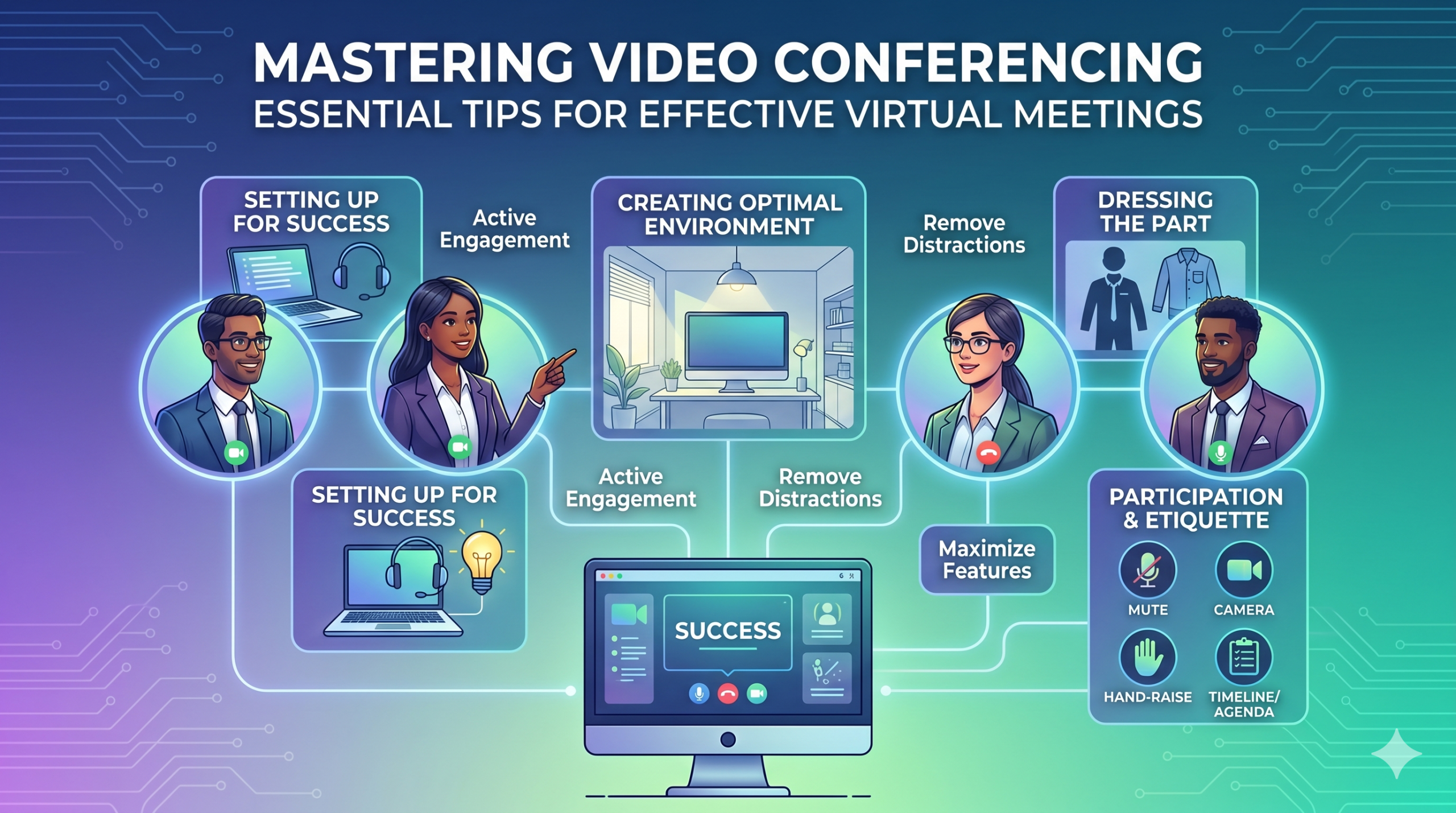
الإعداد للنجاح
Now that so many of us are partaking in video conferences more frequently, making oneself appear and sound professional isn’t always easy when seated in PJs from the waist down.
من المحتمل أننا جميعًا شهدنا وساهمنا في بعض اللحظات غير المثالية، أو حتى المحرجة أثناء مؤتمر الفيديو.
To avoid such situations, here are some video conferencing tips that’ll help you set up for success from the start:
اختيار الأدوات المناسبة
الأشياء الأولى أولاً - يمكن للنظام الأساسي الذي تختاره أن يُحدث فرقًا حقيقيًا في كيفية قيام فريقك بإنجاز الأمور.
إذا اخترت الخيار الخطأ، فقد تواجه مشكلات مثل إعدادات الاجتماعات الطويلة والبطيئة والمعقدة، أو صعوبة الأشخاص في الانضمام إلى الحدث الخاص بك، أو عدم معرفة من حضر، أو امتلاك أدوات محدودة لتقديم المعلومات والتفاعل.
To make the right call on the tool to use, figure out what’s most important for your team.
ربما تحتاج إلى نظام أساسي يعمل بشكل صحيح في متصفح الويب الخاص بك، ويكون تشغيله بسيطًا للغاية، ولديه القليل من التعقيد في الواجهة. ربما كنت تبحث عن ألواح المعلومات لتبادل الأفكار أو وظيفة تسجل الاجتماعات تلقائيًا.
فيما يلي بعض الميزات الأكثر شيوعًا التي يجب البحث عنها في أداة الاجتماعات الافتراضية الفعالة:
- سهل الاستخدام: يجب أن يكون سهل الاستخدام للجميع، حتى للمبتدئين في مجال التكنولوجيا الذين ليسوا على دراية جيدة باستخدام البرامج.
- فيديو وصوت عالي الجودة: لا أحد يريد فيديو أو صوتًا غامضًا يتأخر. تتعامل بعض الأدوات مع إشارات Wi-Fi المنخفضة بشكل أفضل من غيرها.
- Interactive Tools: Tools that help everyone participate and engage – like sending visual reactions, chatting and sharing documents, and more.
- التحليلات: احصل على معلومات حول اجتماعاتك لتحسينها (الوقت، وحجم المشاركين، وإحصائيات المشاركة، وما إلى ذلك).
- يغطي كل ما تحتاجه: يجب أن تعمل الأداة بشكل جيد قبل وأثناء وبعد الاجتماع لتلبية ما تحتاجه بالفعل.
نصائح إضافية لعقد المؤتمرات الفعالة
من المحتمل أنك ستتلقى دعوة للاجتماع قبل وقت طويل من الاجتماع المقرر. انتقل إلى موقع الويب أو قم بتنزيل التطبيق مسبقًا وقم بتسجيل الدخول للتأكد من أن كل شيء يعمل.
لا تتأخر عن الاجتماع لمجرد أنك كنت تحاول تذكر كلمة المرور لتسجيل الدخول أو التنقل بين مجموعة من مطالبات "الإذن مطلوب" للوصول إلى الكاميرا والميكروفون.
تسمح لك معظم مواقع مؤتمرات الفيديو بإنشاء اجتماع اختباري لحل أي خلل في أجهزتك، مثل اكتشاف أن كاميرا الويب الخاصة بك لا تعمل أو أن الميكروفون الخاص بك هادئ جدًا أثناء مؤتمر الفيديو.
خلق بيئة مثالية
ربما تعرف كيف تبدو رائعًا في مكالمات الفيديو، ولكن ماذا عن خلفية مؤتمرات الفيديو الخاصة بك؟ يمكن أن يقول الكثير عنك، وليس دائمًا بطريقة جيدة.
فيما يلي بعض النصائح البسيطة لعقد مؤتمرات الفيديو للتأكد من أن بيئتك ترسل الرسالة الصحيحة في بيئة احترافية:
- Get the Lighting Right: Good lighting makes you look professional. Use natural light from a window. Or go for soft and even lighting. Just don’t have too much light behind you.
- Keep the Background Simple: Don’t clutter your background with too many items. Keep it tidy and neutral. You can add a few personal items for a friendly touch.
- التزيين عمدا: إذا كان لديك رف أو خزانة كتب في الخلفية، فاعرض الجوائز أو الملاحظات المتعلقة بالاجتماع. اجعلها هادفة.
- تجنب الأبواب والنوافذ: قم بتوجيه الكاميرا بعيدًا عن الأبواب والنوافذ لمنع التشتيت ومشاكل الإضاءة.
- Position Your Webcam Right: Place your webcam at eye level, three to eight feet away from you. That’ll help you avoid distortions.
- Create a Permanent Setup: Designate a spot for video calls so you don’t scramble every time. You can use a fabric or paper backdrop for convenience.
- استخدام معاينة كاميرا الويب: تحقق من كيفية ظهور كل شيء على الكاميرا قبل مكالمتك. قم بإجراء التعديلات حسب الحاجة.
تذكري، إذا حدث شيء غير متوقع (مثل اقتحام طفلك الدارج)، حافظي على هدوئك وحافظي على الاحترافية - فطاقتك تساهم أيضًا في "البيئة"، لذا ركزي على عدم فقدان رباطة جأشك.
العرض والمشاركة
تلبيس الجزء
ارتداء الملابس المناسبة للاجتماعات المهنية.
We’ve all had those days when working from home meant staying in pajamas for most of the day. It’s all good if you don’t have any video meetings. But when you do, it’s a big no-no for you and everyone else on the call.
ارتداء الملابس المناسبة للعمل.
You and your team should look the part for virtual meetings, even if it’s casual. You don’t need to wear a suit or a fancy dress but avoid wearing anything you wouldn’t wear at the office. Also, it’s a bit tricky to feel like you’re working when you’re in the same clothes you crashed out in.
You have a choice, though. You can look professional on top and keep comfy sweatpants or leggings on the bottom, out of sight. It’s your call, but being fully dressed might help you keep your head in the game.
المشاركة الفعالة
انظر مباشرة إلى الكاميرا.
Many participants make this slip-up—they look at the video screen instead of the camera when talking to someone online. It might feel natural, but it actually makes you seem like you’re not fully engaged.
It can make you look a bit distant and not so professional. And it’s pretty obvious when you’re not all there during a video call.
فكر في الأمر بهذه الطريقة: looking right into the camera lens is like looking someone in the eye when talking face-to-face. If someone talking to you in real life looks elsewhere instead of keeping eye contact, you’d think they are not interested in what you’re saying, right?
Looking directly into the camera is one of the basic video meeting etiquette. So, give it a go until you get the hang of it. It’ll make you seem more connected and professional during your virtual meetings.
Also, shut down all the extra apps and tabs you don’t need and turn off those pesky notifications that can distract you and your mates.
كتم صوتك عندما لا تتحدث.
People can often tune out background noise on their end, but it’s tough to ignore when you’re on the receiving end of the call.
Nobody’s keen to listen to your cat’s meow in the background. And if they do, you might find the meeting topic shifting to “What cat breed is that? She’s gorgeous!”
Unmuted people can be quite distracting and take the meeting off track. So, let’s make a rule: keep yourself muted unless you are about to speak for a better video conference.
لا تتحدث أبدًا عن الآخرين.
Things can get pretty tricky when you have a bunch of people on the same video call. Be patient, and do not jump in while others are talking—it’s rude and against conference call etiquette.
احفظ أسئلتك حتى النهاية حتى يحصل الجميع على فرصة لمشاركة أفكارهم. هناك أشياء قليلة أكثر إحباطًا من مقاطعتك والتحدث عنها باستمرار، خاصة عندما يكون لديك شيء قيم حقًا لمشاركته
إشراك المشاركين عن بعد باستخدام التكنولوجيا.
تريد أن يشعر المشاركون في اجتماعاتك عبر الإنترنت بالانتماء والراحة. بحسب مؤتمر تقرير, two big issues for remote workers during conference calls are not wanting to interrupt others and not seeing everyone’s faces.
لتسهيل الوصول إلى مؤتمرك الافتراضي، قم بتحسين جودة مكالمات الفيديو.
قم أيضًا بوضع الميكروفون والكاميرا بشكل صحيح، واستخدم التسميات التوضيحية المغلقة، وقم بتوفير خيار الاتصال بالهاتف. تأكد من أن المستندات المشتركة مرئية بسهولة لجميع المشاركين.
قم بتحويل الحاضرين في الاجتماع من مراقبين سلبيين إلى مشاركين نشطين. شجّع الإبداع باستخدام اللوحات البيضاء، واتخاذ القرار من خلال استطلاعات الرأي، ومشاركة الآراء عبر الدردشة، والتعبير عن ردود الفعل باستخدام الرموز التعبيرية الممتعة في اجتماعاتك الافتراضية
الآداب والاعتبارات
إدارة الوقت
كن دقيقًا - كن دائمًا في الوقت المحدد.
This rule applies to all kinds of meetings—in person, on video, or a mix of both. But it’s one of the must-follow video conference best practices in particular. You see, making those personal connections is tougher through screens. Even though tech helps, it’s pointless if you’re absent. So, be there for your colleagues and respect their time.
ضع المناطق الزمنية في الاعتبار عند الجدولة.
قد لا تتمكن من تضمين الجميع في كل اجتماع افتراضي، ولكن يمكنك التأكد من حصول الجميع على فرصة للانضمام إلى بعض الاجتماعات.
One of the tips for video conferencing to consider is to just think about when people are usually busy with their work, where they’re located, and what time zone they’re in. Then, plan your meetings to fit around these factors so that everyone can be a part of it.
إرسال جدول الأعمال قبل الاجتماع.
Keep things simple and clear when you’re getting ready for a meeting. Ensure you’ve got a clear idea of what you want to achieve, and share the plan with your team in advance. This allows everyone to think about what they want to say or ask, setting the foundation for a successful video conference.
للبقاء منظمًا، قم بتضمين جدول زمني في جدول أعمال الاجتماع. يساعدك هذا على البقاء على المسار الصحيح وعدم الانحراف عن الظل. خصص بعض الوقت لبدء الاجتماع بقليل من الدردشة الودية، فهذا يساعد في بناء جو إيجابي.
البقاء خاليًا من التشتيت
قم بإزالة الانحرافات المحتملة من بيئتك.
When you’re right in the thick of a busy workday, you might feel like having a go at doing other things during a video call. But humans aren’t that great at multitasking—only about 2.5% من الناس يستطيعون فعل ذلك.
إن محاولة القيام بالكثير من الأشياء في وقت واحد يمكن أن تجعلك تشعر بالتوتر وتفقد تركيزك. بالإضافة إلى ذلك، يمكن أن يكون ذلك مشتتًا جدًا لزملائك في الفريق أثناء المكالمة. لذا، إليك بروتوكولات مؤتمرات الفيديو التي يجب اتباعها:
- أغلق أي عمل آخر على جهاز الكمبيوتر الخاص بك.
- ضع مكالمة الفيديو وكاميرا الويب أمامك مباشرة إذا كان لديك شاشات متعددة.
- قم بإسكات تلك الإشعارات على جهاز الكمبيوتر والهاتف الخاص بك.
- قاوم الرغبة في التحقق من وسائل التواصل الاجتماعي أثناء المكالمة.
- If you’re working from home with the family around, give them a heads up that you’re on a call so they don’t come barging in.
انتبه دائمًا للاجتماع.
Avoid the urge to check emails or tinker with your PowerPoint during video calls; it’s just not good video conference etiquette. Similar to face-to-face meetings, showing respect to your colleagues by giving them your full attention is necessary.
Here’s one of the top video conferencing tips: If you wouldn’t do a particular action in person, don’t do it during a virtual meet-up.
الخلاصة: تعظيم ميزات مؤتمرات الفيديو
العمل الجماعي يعني العمل معًا ومناقشة الأمور المهمة والسعي لتحقيق نتائج جيدة. يجب أن تكون الاجتماعات الافتراضية هكذا.
Check out your virtual meeting tool’s reports to see how people got involved and what they liked best. You’ve hit the jackpot if the reports say that participants were all about the polls, questions, upvotes, and chats.
Use video tools to get your team chatting, steer them toward group goals, and ensure everyone has a positive vibe. That’s one of the top-secret tips for video conferencing.