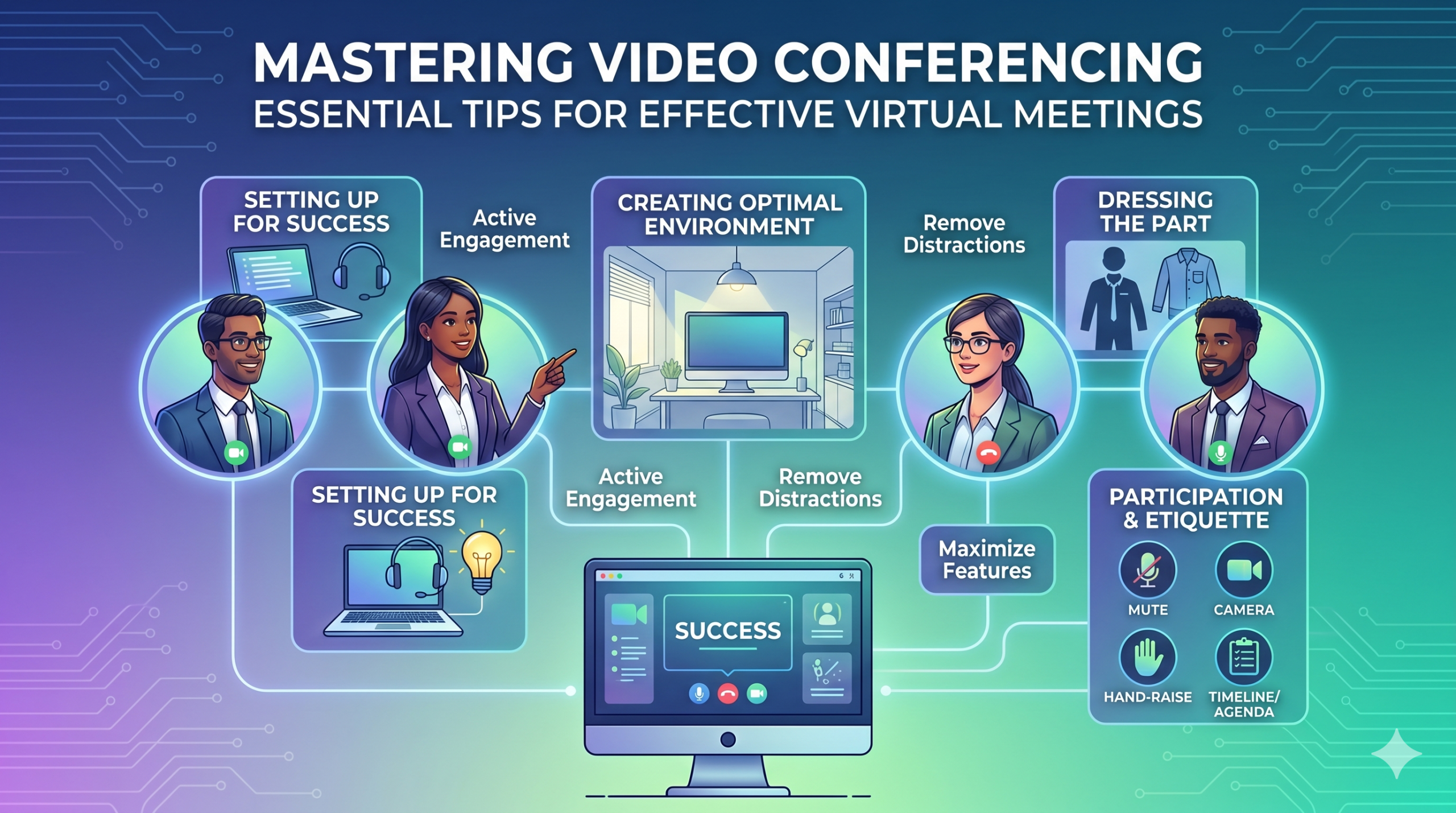

La tecnologia ha canviat la manera com funcionen les empreses ràpidament i no sembla que s'alenteixi aviat. La comunicació, les operacions i el flux de treball han millorat, facilitant el treball col·laboratiu, independentment de la ubicació de l'empresa o dels empleats.
Ara, el treball a distància no és només un avantatge, sinó una nova norma, fent que les reunions virtuals siguin una necessitat.
Aquí hi ha un fet interessant: Gairebé 96% dels empleats aquestes videotrucades ajuden els seus equips remots a sentir-se més connectats.
In virtual meetings, employees are supposed to share thoughts, talk about relevant topics, and solve problems as a team. But more often than not, things don’t go as planned.
People start to tune out, conversations go off track, meetings go over time, and some participants aren’t engaged. The result? We’re left with a lot of room for improvement for virtual meetings to be truly productive and effective.
On the flip side, when meetings go well, there’s a positive vibe in the team, everyone understands their expectations and responsibilities, and productivity and efficiency increase.
That’s what the goal of a great video conference is, every time.
In this article, we’ll share some of the best video conferencing tips to help you achieve more success in your collaborative effects. So read on.
Configuració per a l'èxit
Now that so many of us are partaking in video conferences more frequently, making oneself appear and sound professional isn’t always easy when seated in PJs from the waist down.
Probablement tots hem estat testimonis i hem contribuït a alguns moments menys que ideals o fins i tot vergonyosos durant un vídeo de conferència.
To avoid such situations, here are some video conferencing tips that’ll help you set up for success from the start:
Escollint les eines adequades
El primer és el primer: la plataforma que trieu realment pot marcar la diferència en com fan les coses els vostres equips.
Si aneu amb l'equivocat, és possible que tingueu problemes com ara configuracions llargues, lentes i complexes per a reunions, persones que lluiten per unir-se al vostre esdeveniment, no saber qui s'ha presentat o tenir eines limitades per presentar informació i interactuar.
To make the right call on the tool to use, figure out what’s most important for your team.
Potser necessiteu una plataforma que funcioni directament al vostre navegador web, que sigui molt senzill d'iniciar i que tingui poca complexitat a la interfície. Potser esteu buscant pissarres blanques per fer una pluja d'idees o una funció que enregistri reunions automàticament.
Aquestes són algunes de les característiques més habituals que cal cercar en una eina de reunions virtuals eficaç:
- Fàcil d'utilitzar: hauria de ser senzill d'utilitzar per a tothom, fins i tot per a principiants en tecnologia que no coneixen bé l'ús del programari.
- Vídeo i so de bona qualitat: ningú no vol un vídeo borrós o un àudio amb retard. Algunes eines gestionen els senyals Wi-Fi més baixos millor que altres.
- Interactive Tools: Tools that help everyone participate and engage – like sending visual reactions, chatting and sharing documents, and more.
- Analítica: obteniu informació sobre les vostres reunions per millorar-les (temps, mida dels participants, estadístiques de participació, etc.).
- Cobreix tot el que necessiteu: l'eina hauria de funcionar bé abans, durant i després de la reunió per al que realment necessiteu.
Consells addicionals per a una conferència efectiva
El més probable és que rebeu una invitació a una reunió molt abans de la vostra reunió programada. Aneu al lloc web o descarregueu l'aplicació abans i inicieu sessió per assegurar-vos que tot funcioni.
No arribis tard a la reunió només perquè estàveu intentant recordar una contrasenya per iniciar sessió o navegar per un munt de sol·licituds de "Permís necessari" per accedir a la vostra càmera i micròfon.
La majoria dels llocs de videoconferència us permeten crear una reunió de prova per solucionar qualsevol torsió del vostre maquinari, com ara descobrir que la vostra càmera web no funciona o que el micròfon està massa silenciós durant el vídeo de la conferència.
Creació d'un entorn òptim
És possible que sàpigues com es veu bé a les videotrucades, però què passa amb el teu fons de videoconferència? Pot dir molt de tu, i no sempre de la bona manera.
Aquests són alguns consells senzills per a videoconferències per assegurar-vos que el vostre entorn envia el missatge correcte en un entorn professional:
- Get the Lighting Right: Good lighting makes you look professional. Use natural light from a window. Or go for soft and even lighting. Just don’t have too much light behind you.
- Keep the Background Simple: Don’t clutter your background with too many items. Keep it tidy and neutral. You can add a few personal items for a friendly touch.
- Decora intencionadament: si tens un prestatge o una prestatgeria al fons, mostra premis o notes relacionades amb la reunió. Fes-ho amb propòsit.
- Eviteu portes i finestres: apunteu la càmera lluny de portes i finestres per evitar distraccions i problemes d'il·luminació.
- Position Your Webcam Right: Place your webcam at eye level, three to eight feet away from you. That’ll help you avoid distortions.
- Create a Permanent Setup: Designate a spot for video calls so you don’t scramble every time. You can use a fabric or paper backdrop for convenience.
- Utilitzeu la vista prèvia de la càmera web: comproveu com es veu tot a la càmera abans de la trucada. Feu els ajustos necessaris.
Recordeu que si passa alguna cosa inesperada (com ara que el vostre nen s'hi entra), mantingueu la calma i mantingueu la professionalitat; la vostra energia també contribueix al "entorn", així que centreu-vos en no perdre la compostura.
Presentació i compromís
Vestint la Part
Vesteix-te adequadament per a reunions professionals.
We’ve all had those days when working from home meant staying in pajamas for most of the day. It’s all good if you don’t have any video meetings. But when you do, it’s a big no-no for you and everyone else on the call.
Porteu roba adequada per a la feina.
You and your team should look the part for virtual meetings, even if it’s casual. You don’t need to wear a suit or a fancy dress but avoid wearing anything you wouldn’t wear at the office. Also, it’s a bit tricky to feel like you’re working when you’re in the same clothes you crashed out in.
You have a choice, though. You can look professional on top and keep comfy sweatpants or leggings on the bottom, out of sight. It’s your call, but being fully dressed might help you keep your head in the game.
Participació activa
Mira directament a la càmera.
Many participants make this slip-up—they look at the video screen instead of the camera when talking to someone online. It might feel natural, but it actually makes you seem like you’re not fully engaged.
It can make you look a bit distant and not so professional. And it’s pretty obvious when you’re not all there during a video call.
Penseu-ho d'aquesta manera: looking right into the camera lens is like looking someone in the eye when talking face-to-face. If someone talking to you in real life looks elsewhere instead of keeping eye contact, you’d think they are not interested in what you’re saying, right?
Looking directly into the camera is one of the basic video meeting etiquette. So, give it a go until you get the hang of it. It’ll make you seem more connected and professional during your virtual meetings.
Also, shut down all the extra apps and tabs you don’t need and turn off those pesky notifications that can distract you and your mates.
Silencia't quan no parles.
People can often tune out background noise on their end, but it’s tough to ignore when you’re on the receiving end of the call.
Nobody’s keen to listen to your cat’s meow in the background. And if they do, you might find the meeting topic shifting to “What cat breed is that? She’s gorgeous!”
Unmuted people can be quite distracting and take the meeting off track. So, let’s make a rule: keep yourself muted unless you are about to speak for a better video conference.
No parlis mai per sobre dels altres.
Things can get pretty tricky when you have a bunch of people on the same video call. Be patient, and do not jump in while others are talking—it’s rude and against conference call etiquette.
Guarda les teves preguntes fins al final perquè tothom tingui l'oportunitat de compartir els seus pensaments. Poques coses són més descoratjadores que ser interromput i parlat constantment, sobretot quan tens alguna cosa realment valuosa per compartir
Implica participants remots mitjançant la tecnologia.
Voleu que els participants de les vostres reunions en línia se sentin inclosos i còmodes. Segons una conferència informe, two big issues for remote workers during conference calls are not wanting to interrupt others and not seeing everyone’s faces.
Per fer que la vostra conferència virtual sigui més accessible, milloreu la qualitat de la videotrucada.
A més, col·loqueu el micròfon i la càmera correctament, utilitzeu subtítols ocults i proporcioneu una opció de marcatge del telèfon. Assegureu-vos que els documents compartits siguin fàcilment visibles per a tots els participants.
Transformeu els assistents de la vostra reunió d'observadors passius a participants actius. Fomentar la creativitat amb pissarres, la presa de decisions amb enquestes, compartir opinions a través del xat i expressar reaccions amb emojis divertits a les teves reunions virtuals
Etiqueta i consideracions
Gestió del temps
Sigueu puntuals: sigueu sempre puntuals.
This rule applies to all kinds of meetings—in person, on video, or a mix of both. But it’s one of the must-follow video conference best practices in particular. You see, making those personal connections is tougher through screens. Even though tech helps, it’s pointless if you’re absent. So, be there for your colleagues and respect their time.
Tingueu en compte les zones horàries a l'hora de programar.
És possible que no pugueu incloure tothom a totes les reunions virtuals, però podeu assegurar-vos que tothom tingui l'oportunitat d'unir-s'hi.
One of the tips for video conferencing to consider is to just think about when people are usually busy with their work, where they’re located, and what time zone they’re in. Then, plan your meetings to fit around these factors so that everyone can be a part of it.
Envieu l'ordre del dia abans de la reunió.
Keep things simple and clear when you’re getting ready for a meeting. Ensure you’ve got a clear idea of what you want to achieve, and share the plan with your team in advance. This allows everyone to think about what they want to say or ask, setting the foundation for a successful video conference.
Per mantenir-se organitzat, inclou un calendari a l'agenda de la reunió. Això us ajuda a mantenir-vos en el camí i no sortir de tangents. Dediqueu una mica de temps per començar la reunió amb una mica de xat amable: ajuda a crear un ambient positiu.
Mantenir-se lliure de distraccions
Elimina les possibles distraccions del teu entorn.
When you’re right in the thick of a busy workday, you might feel like having a go at doing other things during a video call. But humans aren’t that great at multitasking—only about El 2,5% de la gent ho pot aconseguir.
Intentar fer massa alhora pot deixar-vos sentir estressat i perdre la vostra concentració. A més, pot ser bastant distret per als vostres companys d'equip a la trucada. Per tant, aquí teniu els protocols de videoconferència a seguir:
- Tanqueu qualsevol altra feina a l'ordinador.
- Col·loqueu la videotrucada i la càmera web just davant vostre si teniu diverses pantalles.
- Silencia aquestes notificacions a l'ordinador i al telèfon.
- Resisteix la necessitat de consultar les xarxes socials durant la trucada.
- If you’re working from home with the family around, give them a heads up that you’re on a call so they don’t come barging in.
Presteu sempre tota l'atenció a la reunió.
Avoid the urge to check emails or tinker with your PowerPoint during video calls; it’s just not good video conference etiquette. Similar to face-to-face meetings, showing respect to your colleagues by giving them your full attention is necessary.
Here’s one of the top video conferencing tips: If you wouldn’t do a particular action in person, don’t do it during a virtual meet-up.
Conclusió: Maximització de les funcions de videoconferència
Treballar en equip vol dir treballar junts, discutir coses importants i aspirar a bons resultats. Les reunions virtuals haurien de ser així.
Check out your virtual meeting tool’s reports to see how people got involved and what they liked best. You’ve hit the jackpot if the reports say that participants were all about the polls, questions, upvotes, and chats.
Use video tools to get your team chatting, steer them toward group goals, and ensure everyone has a positive vibe. That’s one of the top-secret tips for video conferencing.